Craft a Killer LinkedIn Summary: Templates & Examples [+ Free LinkedIn Summary Generator]
If your LinkedIn profile isn't really getting many views or followers…
Or
If there's a decent number of profile views, but not many messages or connections?
This probably means your LinkedIn profile isn't captivating enough.
One major part of that is having an effective LinkedIn summary to really hook those curious visitors in.
You're not alone.
And even better, profiles with good summaries are more likely to be viewed by prospects. In fact, LinkedIn statistics show that profiles with complete information receive significantly more engagement, with LinkedIn's website receiving 1.73 billion visits monthly as of 2026.
Luckily for you, this blog is all you need to create the next Hamlet of LinkedIn summaries.
Note:
And if you’re looking for a quick fix, you can just use our free LinkedIn Summary generator.
We'll also cover,
- How long should a LinkedIn summary be?
- What to include in your LinkedIn summary?
- How do you write a GOOD LinkedIn summary ?
- The best example LinkedIn summaries for Sales purposes
- How to use ChatGPT to generate a captivating LinkedIn summary?
So make sure you stick around till the end, since we'll also talk about a secret way to really boost your network even further.
Without further ado,
What is a LinkedIn summary?
LinkedIn summary, LinkedIn bio, or even your "About" section, they're all basically the same thing.
It's your profile description that tells your story and what you do in just a few paragraphs.
You can customize it for recruiters, hiring managers or even for potential clients, prospects and buyers.
The important part is that you
- Make it captivating and interesting
- Keep it short, no one wants to read an essay on LinkedIn
- Highlight your achievement s, it's your place to shine and show off!
- Have a clear call to action, the summary isn't to entertain viewers but for new valuable connections
We'll go into more depth about all the tips and tricks later, don't you worry.
Let's think about how big this thing should be, size matters 😉,
How long should a LinkedIn summary be?
LinkedIn lets you make summaries up to 2600 characters or 370 words.
However, you shouldn't ever write that much.
An ideal length for LinkedIn summary is around 150-200 words in clear cut paragraphs or points and written with a clear flow.
The most important part is a captivating hook, since LinkedIn will only show the first 2-3 lines before a pesky “See more”.
We've answered "how big?", but we also need to know what the actual content should be.
What to include in a LinkedIn summary?
A strong LinkedIn summary will grab the curiosity of your profile visitors and also promote yourself.
A good LinkedIn summary will tell a visitor
- Who you are
- What you do
- What you've accomplished
- What you can do for them
If we're breaking down the summary into components, we obviously start with the most important thing.
- You must hook them in the first three lines.
LinkedIn doesn't show the entire summary immediately, only the first 2-3 lines are visible before they have to hit "See more".
This means those 3 lines are the most important part of your summary.
It decides if they read the rest or not.
You can consider starting with a personal story, a major accomplishment or directly talking to the reader.
Do not use generic sales-y sentences or buzzwords that will disinterest your users, you need to get them curious for more.
- Mention your achievements and endorsements (Don't be afraid to brag)
The summary is your bio, you need to let people know you're a big shot and someone worth talking to.
Include some of your achievements, even better if you've got some concrete numbers to write.
You can also mention your current role, seniority, impact or the value you've brought to your industry so far.
If you've got some endorsements and testimonials, it'll help you build some credibility as well!
- What's your goal?
Your LinkedIn summary is about YOU, so tell people WHY you do what you do.
This part helps you paint a good image of yourself with an ambitious mission, people feel inclined to support that kind of stuff!
Most importantly, be honest too! Anyone can smell a load of bull a mile away and that's a huge red flag.
- Include keywords for discoverability
Using tons of relevant keywords related to your work and industry helps you in the LinkedIn algorithm.
You'll show up higher for people searching these keywords, meaning more eyes on your profile.
- A summary isn't complete without a CTA!
Let's say you wrote a great summary– captivating hook, engaging content and fantastic accomplishments. And then it just ends.
You put a smile on someone's face but that's it. Not enough.
CALL TO ACTION! Tell them to connect, try a free trial, check out a blog or website.
This builds a smooth transition from a curious prospect to an actual client , and that's what's really important.
You know what not to miss, but how do you structure all these into a fantastic summary?
That's a different question altogether, but let's hold hands and walk through it.
How to write a LinkedIn summary?
First things first, you must have an idea of what you want to write. Make a rough outline.
An outline of your summary can be something like:
- Hook related to your expertise
- Achievements/Endorsement for credibility
- What can you do for the prospect?
- How do you do it?
- Call to action!
It'll be clearer with an example, take a look at this summary that checks on all these points:
Once you have an outline set, you just have to start filling them out.
But make sure you keep some important points in mind as you write your summary.
- Break up large blocks of text
Your LinkedIn summary shouldn't have more than two lines stacked together, this disengages most people's attention.
Break up your blocks of texts into points, different lines or separate paragraphs entirely.
This makes it easier to read and leads to more retention.
- Maintain a flow of conversation
A great way to have your user easily stay on the summary is to keep a light and easy flow throughout.
Don't make sudden changes in topic and switches in writing, have each section flow smoothly into each other.
Make it seem like you're talking to your reader directly one on one, not writing a college essay.
- Include a strong hook, engaging content, achievements and a CTA!
I have to emphasize this again since it's so important, you need to have all the important elements of a summary.
A strong hook in the first two lines is the most important part of your summary.
Ask a question or start a story, something that makes the user want to click on "See more"
Once they hit that See more button, you need to keep them interested with a conversational flow of good content.
Mention your achievements and boost credibility , don't let them think, "Well, who's this guy anyway?"
End on a strong note with a convincing CTA, convert those readers to your recruiters or clients.
- Infuse your personality
Your summary is a great place to show people your authentic self, including passions, hobbies or personal philosophy.
This helps build more real connections with people who don't just look for surface-level achievements and awards.
This could be something like "Besides coding, I'll never say no to a early morning hike or finding birds with my trusty lens"
- Use our cheat code!
If you want to quickly generate a LinkedIn summary, Outly has a free tool just for that.
Mention all relevant details about your skills, target audience, CTAs and summary length.
And Outly's in-built AI will do the rest of the work for you.
Beyond that, it's also got a ton of fantastic features if you really want to get serious about LinkedIn outreach and automation.
But we'll see about that later.
{{mobile-cta}}
3 Best LinkedIn Summaries for Sales
Let's be honest, Sales is an extremely competitive and fierce industry to stand out.
I've been in this industry for a couple years now and have grown to 3.2k+ clients in over 42 countries and LinkedIn marketing has done miracles in that regard.
There's a lot that goes into it and a great LinkedIn summary definitely helps your profile stand out.
So let's take a look at some templates that can get you started.
- I've noticed something…
In the past [X years], I've helped [#] clients achieve [key result], and along the way, I've noticed something:
✅ {3-4 pain points of your target audience}
If you're reading this, you are probably the same.
But here's the truth: It doesn't have to be this way.
The top [X]% of Y professionals aren't just lucky — they follow a process.
Most people don't, which is why [X]% fail to hit their targets.
Even I've failed before. But I don't let my clients fail.
📈 [Metric/result, e.g., "Increased lead conversion by X%"]
📈 [Achievement, e.g., "Helped a client close $X in deals in Y time"]
I keep it simple:
✅ {3-4 points about what you do and how you do it}
While your competitors struggle to figure things out, you could be:
🚀 {3-4 points highlighting what your client's goals are}
It's not about whether X works. It does.
The real question is: How can we make X work for YOU?
If you're ready to take control of your X process and start seeing real results, let's connect: [MEETING LINK]
- The FOMO approach
Every business needs [X that you provide], but most [Y current solution] feels [Z issues with Y]
If you're still doing [Y], you're wasting hours on [Z]
Without a proper X strategy, you're leaving meetings and revenue on the table.
Your competitors are probably already [X that you provide] while you're stuck with spreadsheets and generic templates. (Not that I'm bitter about all those wasted hours or anything.)
I [X] :
↳ 3-4 points about what you do
The numbers speak for themselves:
↳ 30% increase in A
↳ 85% B
↳ Helped dozens of businesses do C
Your competition is already doing [X that you do]
The question isn't if you should do X - it's how much longer can you afford to wait?
DM me or shoot me an email at {email}
Let's get those leads rolling in.🚀
3. Clear and precise
Your ability to {X things that your business helps with} will determine how far you'll thrive as a {targeting customer positions}
This will allow you to:
📈 4-5 points of customer goals
However, booking meetings and closing deals it's harder than ever:
❌ 4-5 pain points
All of these makes you feel miserable
You feel your manager's pressure on your shoulder
And you start thinking that X might not be for you.
Do you relate with this? Because I do - I've been there
This happens because the old way of X doesn't work anymore.
Doing X and praying they get back to you will kill your sales career.
Now, imagine {your main sales hook}
✅ 3-4 points of what you offer
And, {the best benefit you provide}
Wouldn't this be the scenario you would like to be in?
The good news - I can help you get there with:
➝ [4-5 points of what you do]
Now, how serious are you about building your X Career?
Let's make it happen.
👉🏼 Shoot me a DM, or head over to my Featured section.
I'll see you at the top
All these templates are fantastic to help you get a quick headstart on the competition.
The best part is you can customize them to whatever field you're in and regardless of your target customer.
And if you want even more personalization..
How to use ChatGPT to generate a LinkedIn Summary?
ChatGPT provides a ton of personalization, customization and adaptability to help you create the perfect LinkedIn summary. Recent research shows that LinkedIn Summary Generators powered by AI can provide useful assistance by supplying pre-written summary examples, optimal keywords, and content templates organized by industry or job title .
Here's how you do it,
- Prepare your information: Before using ChatGPT, gather specific details about your skills, experiences, and career goals.
It's also recommended to have a list of accomplishments handy to include in your summary.
-
Copy and paste: If you don't want to write a ChatGPT prompt from scratch, you can copy and paste the content from your LinkedIn profile's "Work Experience" section along with your prompt for ChatGPT.
-
Provide relevant information: When using ChatGPT, make sure to include information on your skills and experience.
The more specific and detailed you are, the more relevant and personalized your summary will be.
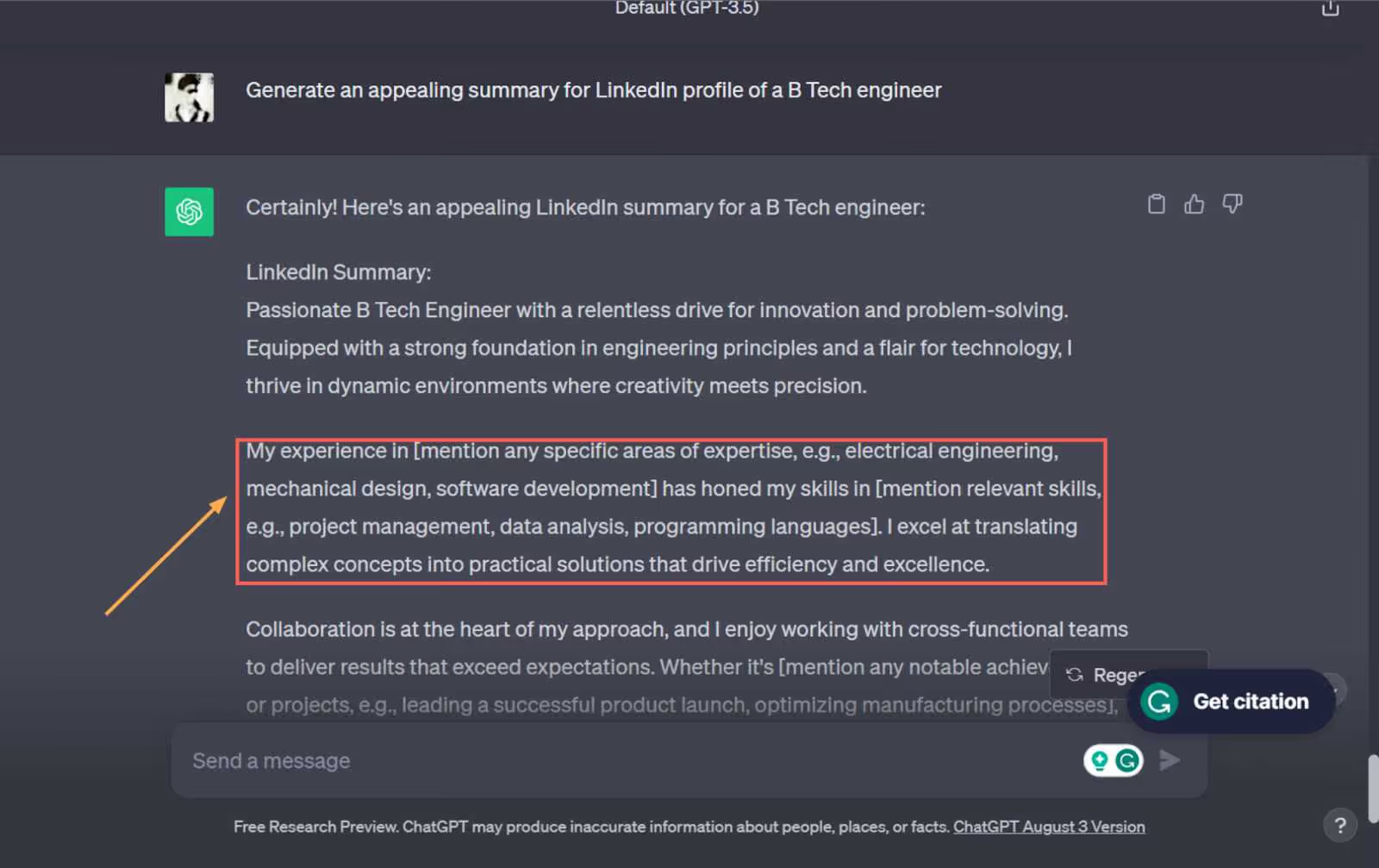
- Ask ChatGPT for help : Simply ask the bot to use the information you provided to write a LinkedIn summary.
ChatGPT will generate a draft summary based on the input you provided.
Here’s a step by step guide on using ChatGPT as a LinkedIn generator.
- Review and revise : After receiving the AI-generated summary, review it and make any necessary revisions to ensure it meets your expectations.
It's important to craft an authentic final version that accurately represents your professional background and goals.
- Enhance your profile: In addition to generating a summary, ChatGPT can provide valuable feedback on every section of your LinkedIn profile.
It can also offer recommendations on how to optimize your profile by drawing upon exemplary use cases.
- Continuously improve : Remember that ChatGPT is a tool and should be used as a guide. Experiment with different prompts and strategies to optimize your LinkedIn profile.
Regularly update and refine your profile to reflect your evolving skills and experiences.
LinkedIn Link Preview Issues
When sharing content on LinkedIn, you might notice that your LinkedIn link preview isn't working correctly or not displaying as expected. This is a common issue that can affect how your content appears when shared. If your LinkedIn link preview not working properly, try refreshing the URL or using LinkedIn's Post Inspector tool. Make sure your website has proper meta tags and Open Graph data to ensure LinkedIn can generate accurate previews of your shared links.
Conclusion
We've learnt a lot about LinkedIn summaries today.
- They're a huge boost to your overall LinkedIn profile
- A strong hook, engaging content with a CTA is vital
- You can use your achievements, endorsements and brand to boost credibility
- ChatGPT can also help you generate a neat personalized summary!
And another helpful tool is Outly's free summary generator.
But that's not all that Outly offers. It can completely simplify your process to convert prospects on a search page to clients in your DMs.
Outly provides LinkedIn + Email automation, sending 100s of hyper-personalized messages automatically.
It's also got,
-
An AI Inbox manager that handles prospect replies and objections.
-
Auto-tagging in Inbox , where prospects are automatically tagged based on their response intent.
-
AI Voice personalization , where you can clone your voice and send hyper personalized voice messages on scale.
-
An AI variables feature where you can add custom or pre-built profile-based variables to make your messages more personalized.
-
Video messages ; you can also add video messages to your sequence and send them on scale.
-
Automated LinkedIn actions like posts, likes, connections, comments, endorsements .
-
Cloud-based functionality to work even when your laptop's off
-
Integrations with popular CRM s to easy fit in your sales pipeline
-
Amazing 17 hours of customer support.
-
Advanced message sequencing, follow-ups, personalized images and more!
The best part? It takes 5 minutes to set up.
-
Login to Outly and create a campaign
-
Select the SalesGPT option for a guided approach using our in-built AI.
-
After describing your company, SalesGPT will generate a list of personas and their pain points for you to target
-
You can then set up a message sequence coupled with a connection request step, which you can customize as you wish.
-
After setting up a message sequence along with follow-ups if they don't respond, your next step is a list of prospects.
Outly can get this through just a simple LinkedIn or Sales Nav search URL.
- For example, just head to LinkedIn and search for your target audience using the available filters.
Then copy the URL, and paste it into SalesGPT.
And that's all there is to it!
You can just sit back and relax while Outly sends out messages, follow-ups, connection requests , even likes and posts on your feed!
Sounds cool? A 14-day free trial to see if it works for you should sound even cooler!
(We don't ask for credit card or phone numbers)
Good luck!
Wow your leads by cloning yourself and sending personalized videos and voice notes to each lead on LinkedIn.
If you don't reply to leads within 5 mins, your chances of converting them fall by 50%. Our AI replies on your behalf instantly! (and yes, you can train it)
Don't shoot in the dark. Get detailed analytics on what's working
Outly allows you to invite other team members, so that they can add their LinkedIn Account, run outreach campaigns and get amazing results just like you.