How to Add Volunteer Experience on LinkedIn (2026)
TL;DR:
Adding volunteer experience to LinkedIn builds credibility, showcases transferable skills, and expands your network, with 75% of hiring managers considering skilled volunteer work in hiring decisions.
Simply click "Add Profile Section," select "Volunteer Experience," fill in details with quantifiable accomplishments, and include relevant keywords to boost visibility.
Read this blog if…
You want to make your LinkedIn profile stand out?
OR
You want to showcase your skills , passion, and personality?
You want to impress recruiters and potential leads with your well-rounded profile?
If you answered yes to these questions, you must add volunteer experience on LinkedIn .
Why?
Because volunteering isn't just good for your soul; it's also good for your career.
In this blog, I'll discuss the Top 4 Reasons You Should Add Volunteer Experience to LinkedIn
But that's not all.
We'll make it easy with 4 Easy Steps to Add Volunteer Experience on LinkedIn
And if you're thinking, "But how do I write the perfect volunteer experience?" I'll share 7 tips on creating the perfect Volunteer Sectionfor your LinkedIn profile
Plus, if you're looking for inspiration, I've got you covered with 2 LinkedIn volunteer experience profile examples
Ready?
Let's get started.
Top 4 Reasons You Should Add Volunteer Experience to LinkedIn
You might think that volunteering is just something you do in your spare time, but it's much more than that.
Well, here are 4 reasons why it matters more than you think:
1. Build Credibility
It's not just about work; showing your volunteer side says you're a well-rounded pro . Bosses dig that.
When you show that you're not only about the 9 to 5 grind but also dedicated to giving back, you instantly become more credible .
People trust those who contribute to their communities.
According to Deloitte's 2016 Volunteer Impact Research , 82% of hiring managers said they would be more likely to choose a candidate with volunteer experience on their résumé.
- Show Off Your Skills
Your volunteer gigs?
It's a secret stash of skills!
It's not just charity; it's a skill-building exercise. Passion, leadership, taking initiative – your volunteering journey shows your work ethic.
Adding volunteer information can help hiring managers understand your transferable skills . The outcomes you've helped support through volunteer work may be just those types of accomplishments that employers are looking for.
Make sure to add your job profile to your LinkedIn bio because that will help you increase profile views .
3. Network Expansion
LinkedIn isn't only about work.
You want to form strong personal relationships, too.
When you show off your volunteer stuff, you open the door to meeting many people who share your interests.
That person who cares about the same cause as you might be your ticket to a fantastic job or a big deal.
4. Do Good, Look Good.
Giving back is a win-win.
It's good for your soul and your professional street cred.
Volunteering is more than just a good deed. It shows that you're not just a workaholic, but also a cool and kind person.
You show that you have a story to tell about who you are, what you can do, and what you care about. Who wouldn't want to hire you?
P.S. Want to learn more about how to reach out to recruiters on LinkedIn ?
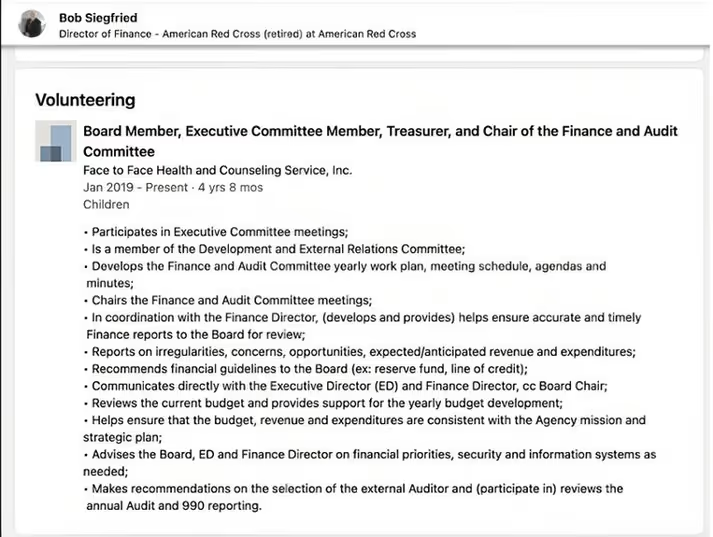
And don't take my word for it.
Info:
According to a LinkedIn survey , 41% of hiring managers consider volunteer work equally as valuable as paid work experience. Separately, 20% of hiring managers have offered a job specifically because of a candidate's volunteer experience.
You might also want to learn how to build your brand on LinkedIn and showcase your volunteer work to potential employers and clients.
How to Add Volunteer Work in LinkedIn - 4 Easy Steps
Adding volunteer experience is super easy and fast .
Just follow these 4 simple steps:
1. Click "Add Profile Section."
This button is located just below your profile picture and name.
A list of profile sections will pop up when you click on it.

2. Pick "Volunteer Experience."
From the list of profile sections, scroll down to Recommended-> Additional -> Add Volunteer Experience.
You can also add volunteer activities to LinkedIn's Experience section, which is appropriate and often beneficial, provided you apply the same standards you would to paid roles.

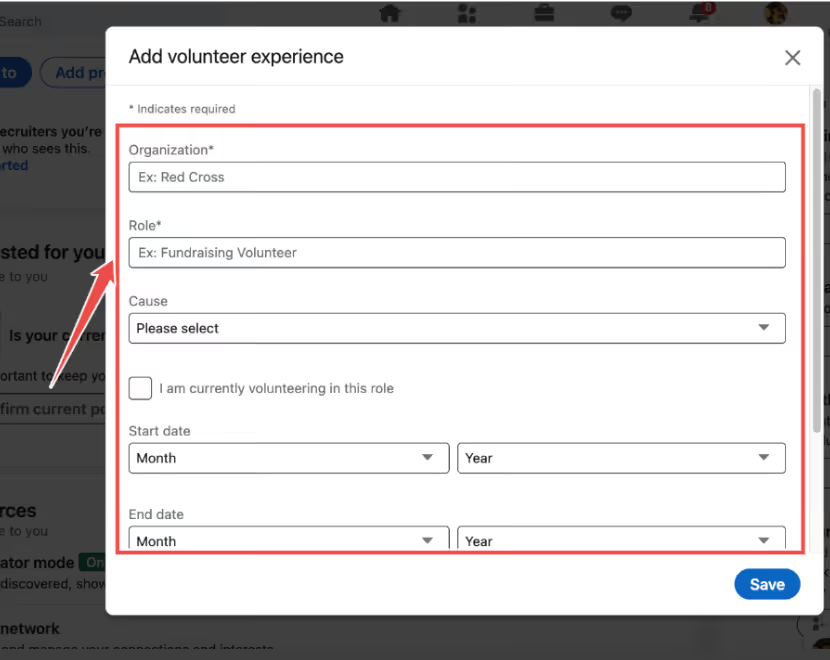
3. Fill in the Details.
Now fill in the following information (required fields):
- Organization: The name of the organization you volunteered with.
- Role: Your role at the organization.
- Dates: The dates you volunteered.
- Description: A brief description of what you did and your responsibilities.
According to a 2025 case study, detailed volunteer descriptions can significantly enhance your profile's visibility.
For example, a volunteer who listed accomplishments like earning multiple Presidential Service Awards saw a noticeable boost in engagement.
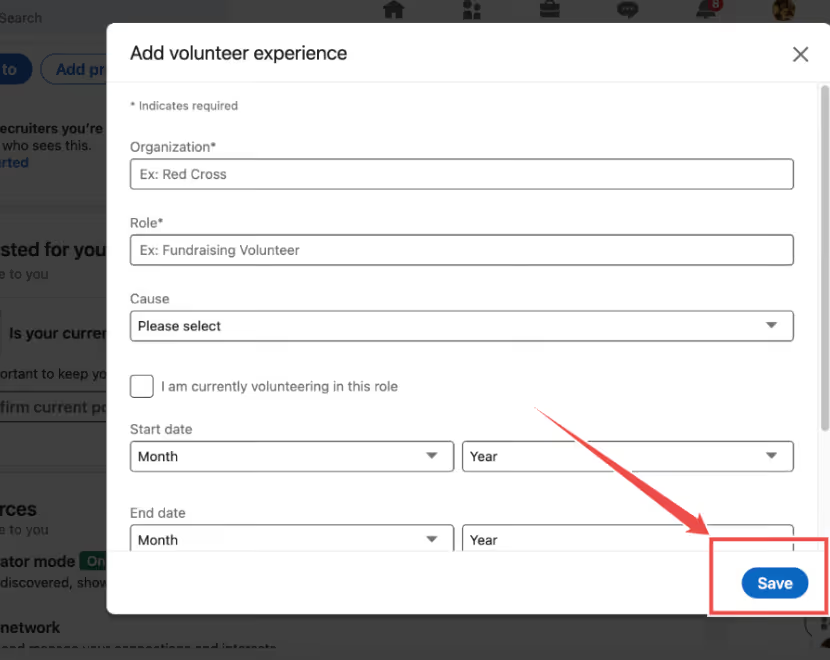
4. Tap "Save."
Click on save at the end, and your volunteer experience will now be added to your LinkedIn profile.
That's it! Piece of cake.
Reorder or Remove Volunteer Experience on LinkedIn
Let's say you've now added multiple volunteer experiences to your profile. But what if you want the freshest one up top or feel like ditching an older one?
Here's how to make it happen:
How to Reorder Volunteer Experience on LinkedIn
- Click the "Edit profile" button on your LinkedIn profile.
- Click the pencil/edit icon on the section, then use the reorder icon that appears next to each entry to drag it into your preferred order.
How to Remove Volunteer Experience on LinkedIn
- Click the "Edit profile" button on your LinkedIn profile
- Click the "Remove" button next to the volunteer experience you want to remove.
- Click "Save."
Easy peasy.
Volunteer Experience LinkedIn Examples:
Need some inspiration for your volunteer experience on LinkedIn?
Let me introduce you to some amazing folks doing great things through their volunteer work.
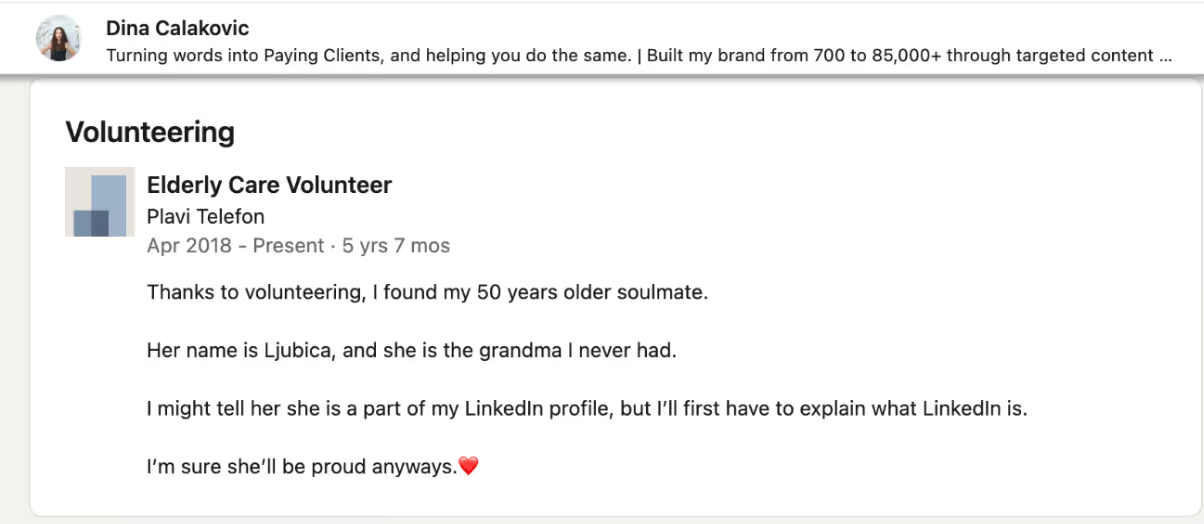
Meet Dina Calakovic .
Dina didn't just grow her profile from 700 to 85,000+ followers.
She's also been a rockstar Elderly Care Volunteer at Plavi Telefon for over 5 years.
It's not just about time; it's about her heartwarming bond with Ljubica, her newfound grandma :)
Meet Renee Cohen ,
The Certified Financial Planner for Women.
She's a financial guru, but even more remarkable is her gig as a Donor and advocate at Alex's Lemonade Stand Foundation .
Alex's Lemonade Stand Foundation is about improving life for kids with cancer.
They do research, raise awareness, and support families.
Renee's commitment to this cause is impressive, and it matches her values and dreams perfectly.
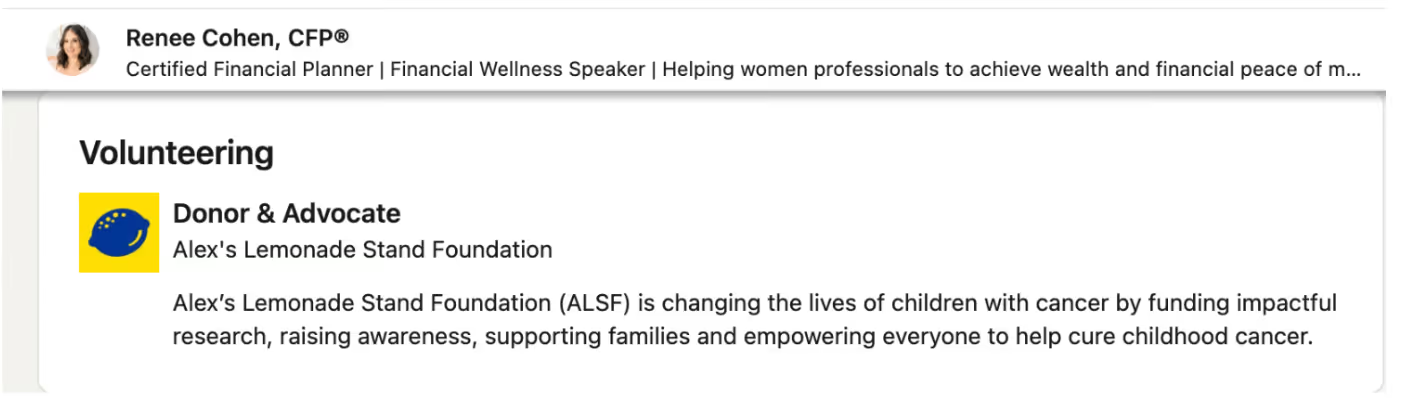
In these LinkedIn profiles, we feel the magic of giving back and creating an impact. Potential prospects/recruiters feel this magic, too.
This makes your LinkedIn profile feel more human rather than just professional.
How to Add the Perfect Volunteer Experience on LinkedIn
- Share Your Story
Start with an eye-catching title . Tell folks what you did and for how long.
Start with a solid opening sentence that captures the reader's attention and summarizes the main point of your volunteer role.
For example , "I helped raise $10,000 for a local animal shelter by creating and executing a social media campaign".
- Show Your Impact
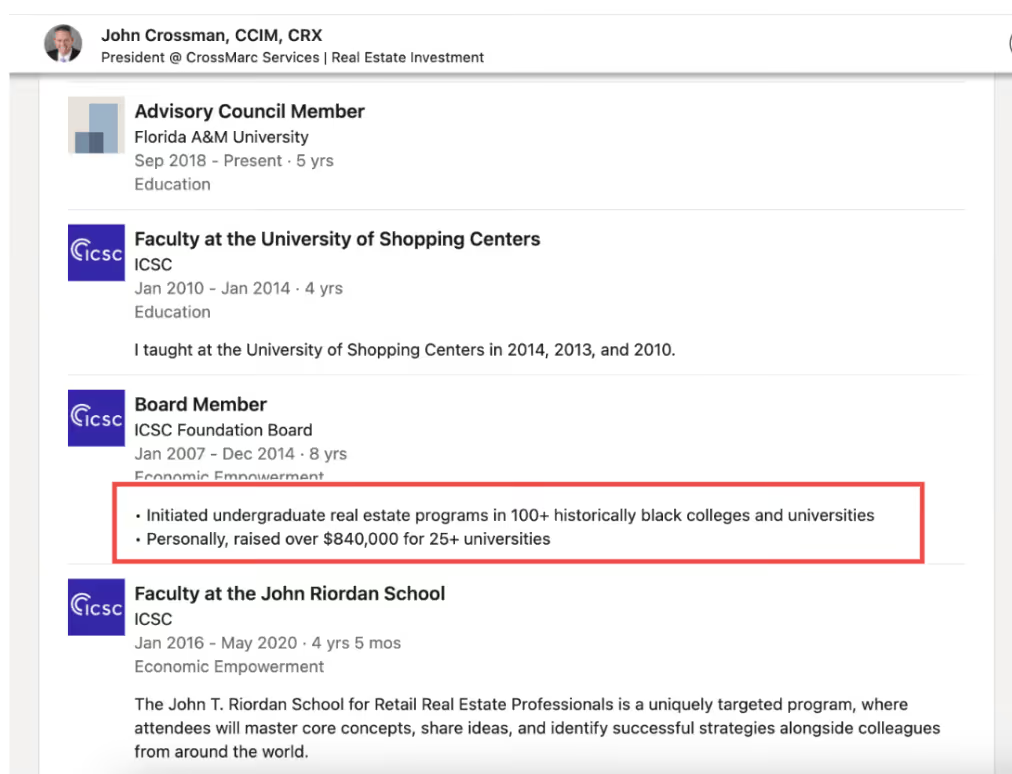
Don't just say "Volunteer." Share your role, achievements, and impact in detail.
Explain how your work changed things, big or small.
- Use Keywords:
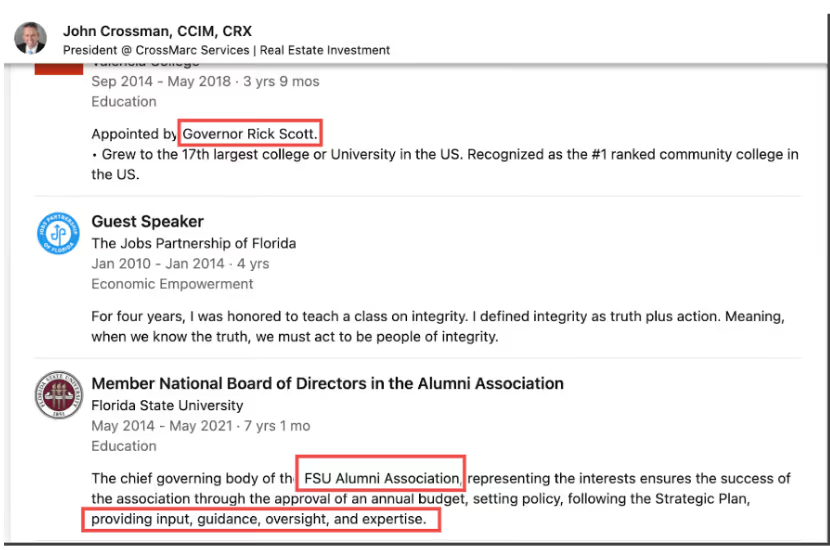
Incorporate relevant keywords in your description to help others find you.
Use words that help others find your profile.
- Add Pics or Docs!
A picture's worth a thousand words. Upload a photo related to your volunteer work . Also, photos add even more credibility.
- Get Personal.
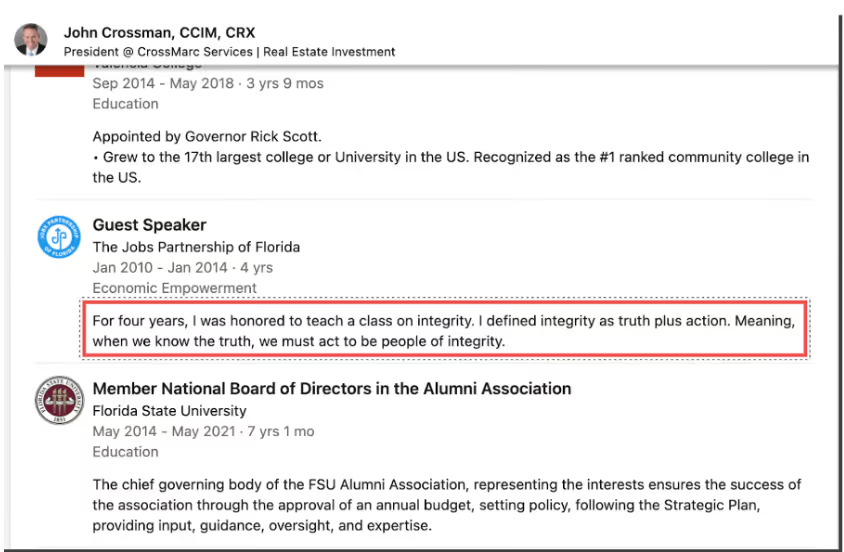
Share why it's important to you. Passion is catchy.
Write a short description sharing what inspired you to volunteer and the difference you're making.
- Get a Nod
Ask your buddies from the gig to vouch for your skills. These recommendations are sure to boost your credibility .
- Engage Game
Keep your experience fresh. Show you're still excited.
Interact with posts related to your cause . It shows your commitment and passion.
- Link Up:
Follow and buddy up with groups you care about. Link your volunteer experience to the organization's LinkedIn page.
- Spread the Good Vibes.
Share your volunteering journey on your feed. You might inspire someone! Mention skills you've developed through your volunteer work. It's a subtle way to show your expertise.
Remember, it's not about being perfect.
It's about sharing your story and making a difference.
2 Ready-to-Use Templates
Want to make your LinkedIn volunteer gig look awesome?
Here are 2 simple templates to get you started.
Template 1
Template:
I [action verb] [result] for [organization name] by [task or activity]. I [skill or quality] by [example or evidence]. I [positive note]. During my time as [your role], I was responsible for [briefly describe your key responsibilities]. What makes this experience unique is [mention a significant achievement or impact you've made]. I'm proud to have been part of something that matters.
Example:
I helped raise $10,000 for a local animal shelter by creating and executing a social media campaign. I learned to use social media tools like Hootsuite , Canva , and Buffer .
I also improved my communication, creativity, and project management skills.
I loved working with such a dedicated team of volunteers and staff. I’m proud to have contributed to such a noble cause.
Template 2
[Organization name] is a [cause or description] that [goal or purpose].As a [role title], I [task or activity] that [result]. This [skill or quality] by [example or evidence]. I [positive note]. I've been a dedicated [your involvement] with [cause/organization], where my role involves [explain your role and how it supports the cause]. Being part of this cause means the world to me, and I'm thrilled to contribute to something that truly matters.
< a href= "https://saveanimalsfacingextinction.org/" target="_blank">Save the Animals is a non-profit organization that rescues and rehabilitates abused animals.
As a volunteer coordinator, I recruited and trained over 50 volunteers who provided care and support for over 100 animals.
This showcased my leadership, organization, and interpersonal skills. I had a blast working with such a fantastic group of people and animals.
I’m grateful to have been part of such a rewarding experience.
There you have it.
These templates are like modeling material; you can shape them to fit your unique experiences.
Add your own stories, be yourself, and let your passion shine.
Note:
Volunteer work increases your chances of being hired by as much as 27% on average, even if you’ve experienced significant gaps in employment or periods of unemployment.
But don't just copy and paste them.
Make them your own by adding your personal touch and flair.
How to Get Relevant Volunteering Experience on LinkedIn: Top 3 Tips.
Let's chat about nailing your volunteer experience.
1. Define Your Passion.
First, dig deep and find what truly inspires you.
- What causes do you care about?
- What skills do you want to use or learn?
- What kind of impact do you want to make?
All you have to do is type keywords on LinkedIn search that describe what you love , such as animals, education, environment, etc.
LinkedIn will then show you a list of volunteering gigs that match your interests.

2. Search Smart
It's time to narrow down your options.
Here's the magic trick:
LinkedIn makes this easy with its nifty search filters.
You can filter by location, duration, skills required, organization type , etc.
It's like having a volunteer matchmaker right at your fingertips.
3. Connect with Purpose
Manually reaching out to people offering volunteer gigs can be time-consuming.
That's where Outly comes in.
Outly is an intelligent tool that helps you message LinkedIn's most relevant volunteering gigs on Scale . It's like having a personal assistant who does your hard work.
Outly has your back with its smart messaging feature.
It helps you craft personalized messages that show why you're interested in the volunteering gig and how your skills can make a difference.
Outly sends the messages to the volunteer organizations on autopilot.
You can connect with multiple organizations in minutes without sounding spammy or generic.
Outly simplifies the process, making it a breeze to spot and connect with the right opportunities.
And the best part? You can get started with a 14-day free trial .
Conclusion
Let's wrap things up.
Adding volunteer experience to your profile isn't rocket science; it's a simple way to boost your professional image.
In this blog, we've covered the importance of adding volunteer experience to your LinkedIn profile and how it can significantly benefit your professional image.
We discussed the top 4 reasons for including volunteer work, which range from building credibility to expanding your network and showcasing your skills.
You've also learned the 4 easy steps to add volunteer experience to your LinkedIn profile in just three minutes.
To help you find the most relevant volunteering opportunities, we introduced you to Outly , an intelligent tool that simplifies the process of discovering, filtering, and messaging potential volunteer gigs.
With Outly, you can define your passion, search smart, and connect with purpose.
So, why wait?
Sign up at Outly today and you can try our tool at 14-day free trial!
Get started on your journey to creating a killer LinkedIn profile that will help you stand out and positively impact your professional life.
Wow your leads by cloning yourself and sending personalized videos and voice notes to each lead on LinkedIn.
If you don't reply to leads within 5 mins, your chances of converting them fall by 50%. Our AI replies on your behalf instantly! (and yes, you can train it)
Don't shoot in the dark. Get detailed analytics on what's working
Outly allows you to invite other team members, so that they can add their LinkedIn Account, run outreach campaigns and get amazing results just like you.