LinkedIn Account Restricted? 5 Steps to Fix It Fast
TL;DR:
5 Main Reasons Your LinkedIn Gets Restricted :
- Posted inappropriate/unprofessional content against community policies
- Used unsafe automation tools (especially Chrome-based ones LinkedIn easily detects)
- Lied about work experience, education, or used fake profile info
- Sent spammy connection requests with copy-paste messages
- Too many people reported you as "I don't know this person"
- Warning: Minor violation, account still accessible
- Temporary: Can't access account for days/weeks, but recoverable
- Permanent: Account gone forever for severe violations
How to Recover Your Account (Dos & Don'ts):
DO:
- Stay calm and follow on-screen instructions
- Contact LinkedIn support professionally
- Provide government ID for identity verification
- Review LinkedIn's policies to understand violations
DON'T:
- Create multiple accounts to bypass restrictions
- Keep using automation tools that got you banned
- Spam LinkedIn support with multiple emails
- Be rude to support staff
Prevention Tips:
- Connect only with relevant professional contacts initially
- Use safe, cloud-based automation tools (like Outly) instead of risky Chrome extensions
- Engage authentically with others' posts
- Be patient with connection building - don't rush
So you've been sending messages and connection requests from your LinkedIn account , and it's worked in your favor.
You're getting more business than ever!
It's been fun so far, you open your LinkedIn on a Monday morning, and..
- Has your LinkedIn account been restricted?
- Is it temporarily restricted or a permanent ban?
- Can you ever get it back?
I know you have these questions in your mind.
And you're not alone. LinkedIn has restricted my account as well as my team members' accounts before. And we got them back every time.
In this blog, I'll share my experience with LinkedIn account restrictions, including:
💥The top 5 reasons why your LinkedIn account might get banned.
💥We'll also talk about Warning, Temporary, or Permanent Restrictions .
💥And finally, I'll show you how to bounce back with thedos and don'ts of re-opening your restricted LinkedIn Account.
💥Once you get it back, we'll discuss how you can keep your account safe from more restrictions down the road.
Let's figure this out together. Grab a cup of coffee, sit down, and let's do this!

Why is my LinkedIn account restricted? 5 reasons why
LinkedIn account restrictions are common , but they always leave you puzzled and wondering what went wrong.
LinkedIn has rules to keep the platform safe and professional. If you break these rules, your account could get restricted.
Here are 5 reasons why:
- You posted something mean or hurtful.

LinkedIn is a website where people connect for jobs. It has rules to keep things friendly and helpful.
When you post content that goes against LinkedIn's Professional Community Policies, your account might get restricted. This includes hate speech, spam, unprofessional comments, or egregious violations like child sexual abuse material, terrorism, extremely violent content, or egregious sexual harassment.
For the most serious violations, LinkedIn may permanently restrict your account after just one incident. Repeated or egregious offenses will result in account restriction according to their enforcement policies.
This happened with one of my team members.
- You used unsafe LinkedIn automation tools.
Okay, so this needs a bit of discussion.
We all know LinkedIn isn't a big fan of automation tools .
So why even bother using them?
Well, they can be pretty awesome.
They help you save time , find more potential connections , and let you generate warm leads on autopilot.
But the big question is, how do you do it safely?
Alright, let's break it down:
Common violations include sending too many connection requests . LinkedIn now limits this to approximately 100 per week for most accounts , though trusted users with high Social Selling Index scores and premium accounts like Sales Navigator can often reach up to 200 per week . Other violations include engaging in spammy behavior outlined in LinkedIn's policies. You have to take temporary limits seriously.
There are 2 main types of automation tools Chrome-based and cloud-based .
The Chrome-based ones are little helpers that work inside your internet browser.
The catch?
You must turn them on manually every time , and LinkedIn can easily spot them.
Now, cloud-based tools , like Outly, keep you off LinkedIn's radar with a dedicated IP address and work 24/7.
Outly focuses on campaign building, inbox management, and compliance controls that reduce the risk of triggering LinkedIn restrictions. Unlike many aggressive automation tools, Outly respects official messaging and connection limits imposed by LinkedIn.
With Outly , you can send personalized messages to 150+ prospects daily (which, of course, helps you save a ton of time).
It's an AI-powered bot that takes over your manual work of sending connection requests, writing a message, and following up with your prospects.
Outly also gives you a dedicated IP address and works 24/7 for you in the cloud.
So, why do you need a dedicated IP address?
A dedicated IP address is like having your own online address . It's just for you, and no one else shares it.
This keeps you off LinkedIn's radar.
See, LinkedIn monitors IP addresses to see what users are up to.
If you use one IP address for many different accounts or send out many connection requests from the same address, LinkedIn might think you're a bot .
But that's just the beginning of what it offers
Outly helps you:
- Set time limits for automated actions (so no more worrying about too frequent or too delayed responses).
- Personalize messages to make it seem like you wrote them just for them .
- Make it possible for your online chats to turn into real and meaningful conversations .
- You lied about your work experience or education.
Uh oh!
You pretended to be someone you're not on LinkedIn.
Maybe you used a fake name or picture or lied about your skills .
LinkedIn considers fake profiles a serious violation of its User Agreement and Professional Community Policies and doesn't tolerate this illegal activity.
Everyone can see your profile, so don't pretend to be someone you're not on LinkedIn.
How will your prospects trust you if they don't think you're being real?
LinkedIn wants to make sure that everyone on the platform uses it in a safe and respectful way and watches for activities that are out of the ordinary.
For example:
❌Adding lots of connections really fast, and
❌Spamming people's inbox with the same message.
So, don't just copy-paste connection requests to everyone you meet, hoping they'll accept.
Instead, take the time to personalize your messages and explain why you want to connect with them.
LinkedIn now limits connection requests to about 100-200 per week to encourage quality networking and reduce spam.
- Too many people reported you

This look familiar to you?
Well, there are chances that many people reported you as 'I don't know this person.'
This ends only one way, with a restriction on your LinkedIn account.
So be careful who you're sending requests to.
Does this mean you should never send requests to people who don't know you?
Not exactly. You can warm up to them in different ways BEFORE sending a connection request, like react to a post, comment, etc., to make yourself visible to them first, so they don't report you!
So, how is your account ban temporary or permanent?
Warning Vs. Temporary Vs. Permanent LinkedIn Bans: What's the difference?
If you've violated LinkedIn's policies, you could face a warning, a temporary restriction, or even a permanent ban from the platform.
Let's see what each of these means for you:
- A Warning:
A simple warning is the least severe penalty you can get, trust me.

It's typically issued for minor violations , such as posting inappropriate content or sending unsolicited messages.
If you receive a warning, you'll be notified by email and can review your actions and make changes.
If you get a warning from LinkedIn, consider it a friendly tap on the shoulder telling you to ease up.
Your account isn't banned, and you can continue using LinkedIn even with a warning.
- LinkedIn Account Temporarily Restricted
A temporary restriction is where things start getting more serious.

This one's typically issued for repeat violations or more serious violations, such as posting hate speech, engaging in harassment, sending too many connection requests, engaging in spammy behavior, or suspicious robotic activity from your account.
If your LinkedIn account is temporarily restricted, you won't be able to access it for a short period of time.
The duration of the restriction will vary depending on the severity of the violation, but it typically lasts from a few days to several weeks.
After the restriction period is over, you'll be able to access your account again .
Warning!
However, your account may be permanently restricted if you repeat the violation.
More on that below.
- LinkedIn Account Restricted Permanently
Okay, let's take a deep breath.
Landing in the "permanently restricted" zone is serious.
You might've crossed some big lines.
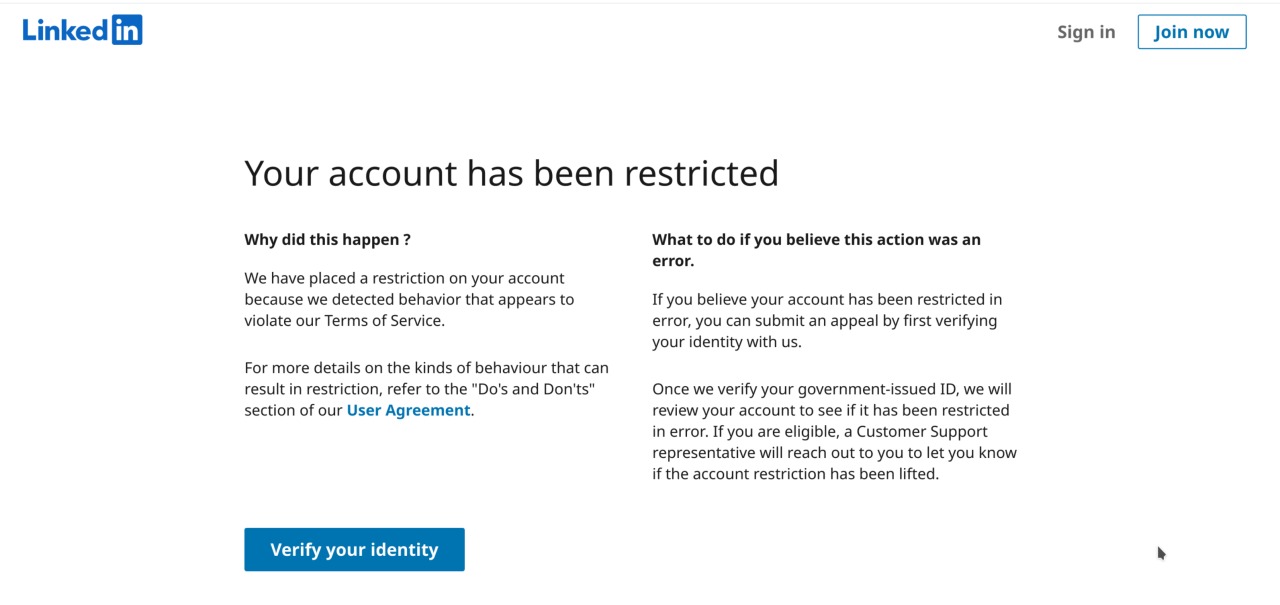
A permanent restriction is the most severe penalty that LinkedIn can issue.
For certain egregious violations of LinkedIn's Professional Community Policies, you may permanently restrict your account after a single violation . This includes severe violations such as child sexual abuse material, terrorism, extremely violent content, egregious sexual harassment, creating fake profiles, or continuing suspicious activity even after facing warnings.
If your account is permanently restricted, you'll never be able to access it again.
LinkedIn will consider your history of warnings and temporary restrictions when determining the penalty.
Please Note:
If you're unsure whether your actions could violate LinkedIn's policies, it's best to err on the side of caution. Review LinkedIn's Professional Community Policies carefully and familiarize yourself with the platform's guidelines.
How can I Reopen My Restricted LinkedIn Account? [Dos and Don'ts]
If you're also wondering, "How can I reopen my restricted LinkedIn account?"
Don't worry; there's a way to get your account back (if you have a temporary restriction)
Dos:
✅Stay calm and don't panic: Losing access to your LinkedIn account can be frustrating, but don't let emotions get the better of you.
Approach the situation calmly and rationally.
✅Review LinkedIn's policies: Before jumping into action, take time to understand LinkedIn's policies and guidelines .
This'll give you a better idea of why your account might've been restricted.
✅Follow the on-screen instructions: If you see any on-screen prompts or instructions related to your account restriction, follow them carefully.
These instructions are often designed to help you resolve the issue.
For example, if you can't log in to your account, you may be prompted to verify your identity by uploading a photo of your government-issued ID.
✅Submit an appeal through official channels: If the on-screen instructions don't help, or if you believe your account's been restricted unfairly, submit an appeal with proper documentation through LinkedIn's Help Center .
They can review your case and provide further guidance.
✅Be prepared to provide proof of identity: If LinkedIn asks you to verify your identity, get ready to submit a government-issued ID or other documentation.
This helps LinkedIn ensure that you're the rightful account owner. Identity verification is optional, but adding it helps build trust on the platform.
What types of government-issued IDs are accepted:
LinkedIn accepts several government-issued IDs, including
- Driver's license
- Passport (NFC-enabled or e-passport for identity verification through Persona)
- Government card
✅Verify your account: Get your LinkedIn account verified right after you create it. It's a small grey tick next to your LinkedIn name but it carries serious weight! (See in my profile)
Don'ts:
❌Create multiple accounts: Don't create multiple LinkedIn accounts to bypass the restriction.
This makes things worse and could trigger a permanent ban. LinkedIn may permanently restrict accounts after a single violation for certain egregious violations like child sexual abuse material, terrorism, extremely violent content, or egregious sexual harassment.
❌Keep using third-party tools: Stop using third-party tools or automation services on your LinkedIn account right away.
You can switch to safer tools once you get your account back.
❌Send multiple emails: Don't flood LinkedIn's support team with multiple emails.
This clogs up their system and delays your response.
One well-written appeal with proper documentation is enough. Their usual response time is 2-3 business days.
❌Be rude or disrespectful: Remember, the LinkedIn support team wants to help you.
Be polite and respectful, and explain your situation clearly. Rudeness won't get you anywhere.
With some effort, you'll be back on your LinkedIn journey quickly.
How to Prevent LinkedIn Account Restrictions in the Future?
Let's talk LinkedIn safety because who needs the hassle of account restrictions anyway? 🚫
Here are a few tips to help you prevent LinkedIn account restrictions :
1. Choose your LinkedIn Connections wisely.
Early on, you need to be picky with your invites.
Stick to people in your professional circle like work colleagues, schoolmates, and industry contacts.
Gradually expand, but keep it relevant.
Be aware that LinkedIn now limits connection requests to about 100-200 per week to encourage quality networking and reduce spam. Most standard accounts get around 100 weekly invites, while trusted users with high Social Selling Index scores and premium accounts can reach up to 200.
Pro tip:
A polished profile is your golden ticket to getting those connections to say, "Yes, please!"
2. Choose a safe and reliable third-party tool.
Tons of LinkedIn automation tools exist out there.
You need to pick one that can
✅Write and send human-like messages on autopilot
✅Create drip campaigns that have a 32%+ response rate across several channels
✅Send 150+ LinkedIn connections weekly without risking your account
✅ Has a Smart Reply Detection feature that automatically stops sending your leads follow-up messages after they reply so you can take over the conversation
Or in other words, you need to pick an automation tool like Outly , because it
💥 Respects LinkedIn's official messaging and connection limits to keep your account safe
💥 Uses compliance controls that reduce the risk of triggering LinkedIn restrictions
💥 Creates hyper-personalized messages using profile information like volunteering work and college details
This approach keeps you in LinkedIn's good books because no one reports you for spamming their inboxes , and all that engagement makes their algorithm certain that you're not a bot.
Need proof? Watch this video!
If you're wondering how to reopen a restricted LinkedIn account?
The best move is not getting flagged in the first place.
We have something for that as well:
Outly's AI Variables go beyond "Hi {{firstName}}". It pulls in real, relevant context so your outreach feels safe and, well, human.
There's much more Outly has to offer, btw.
What makes it even better?
So, you can relax and watch the sunset while those leads keep rolling in.
3. Engage with others' posts.
Don't just sit back and wait for people to connect with you.
Take the initiative and engage with others' posts.
Like and comment on their posts, and share them with your network.
LinkedIn loves an engaged user!
4. Be patient.
It takes time to build a strong LinkedIn network. So, you need to be patient.
Going overboard with connection requests will almost certainly land you in LinkedIn jail. LinkedIn's policies are clear: sending too many connection requests, engaging in spammy behavior , and other violations can get you restricted. Current LinkedIn connection limits are about 100-200 per week , depending on your account type and Social Selling Index (SSI) score.
Don't get discouraged if you don't see results overnight. Just keep calm and keep connecting (or just use Outly!)
Conclusion: Stay out of LinkedIn Jail
High five!
You've made it all the way here.
Here's a quick recap of what we've covered:
- Discussed the different types of LinkedIn bans
- Checked out the dos and don'ts for reopening your restricted account
- Talked about the steps you can take to prevent LinkedIn from restricting your account again
Now, if you ask me, I believe it essentially comes down to these 2 things :
☝🏼LinkedIn wants your account to be professional
This means using content that's appropriate for a safe work environment.
So, before posting, ask yourself: "Would I get into trouble with HR if I shared this at my workplace?" If the answer is yes, then don't post it.
Simple.
✌🏼LinkedIn wants to ensure you're legit (read: human)
Sending bulk connection requests and messages will make their algorithm suspect there's a bot behind that profile pic of yours.
You don't want that.
So, warm up your account and send connection requests carefully .
In short, use a safe cloud-based tool like Outly. Outly respects official messaging and connection limits imposed by LinkedIn , making it crucial for long-term account safety. For certain egregious violations, LinkedIn may permanently restrict your account after a single violation . However, for most violations, temporary restrictions typically last a few days or weeks , while repeated or severe violations can lead to permanent bans.
Nail these, and rest assured, your LinkedIn profile will be out of harm's way.
Ummm, since we still have some time, let's shake things up a bit today.
How about a little quiz ?
Sounds fun? Cool, answer this:
Which of the following can Outly do for you?
a) Pull prospects from LinkedIn and Sales Nav automatically
b) Send personalized messages to prospects on autopilot
c) Work 24/7 with a dedicated IP address .
d) Like and comment on other people's posts on your behalf
e) All of the above .
In fact, I'll make it even more interesting.
Mail me the correct answer at saurabh@useoutly.com , and I'll give you a FREE 14-day trial of Outly!
Okay, okay, who am I kidding,
I'll give you the free trial even if you send me the wrong answer.
In fact, I'll give you the FREE 14-day trial even if you don't take the quiz at all .
We don't need your phone number either .
Just give Outly a try and see if it works for you . That's it.
And hey, if you found this blog helpful, drop me a word anyway. I look forward to hearing from you.
Here's hoping you make the most of your LinkedIn experience.
Until next time!
Psst, by the way, the right answer to the quiz is e) All of the above .
Outly makes prospecting on LinkedIn easy and safe.
See ya!
Wow your leads by cloning yourself and sending personalized videos and voice notes to each lead on LinkedIn.
If you don't reply to leads within 5 mins, your chances of converting them fall by 50%. Our AI replies on your behalf instantly! (and yes, you can train it)
Don't shoot in the dark. Get detailed analytics on what's working
Outly allows you to invite other team members, so that they can add their LinkedIn Account, run outreach campaigns and get amazing results just like you.