How to Scale Hyper-Personalized LinkedIn Outreach in 2026? [Quick Guide]
TL;DR
LinkedIn outreach fails because most messages sound the same and get ignored.
The fix to this is hyper personalization at scale.
The 6-step approach:
- Send custom connection requests based on real profile signals
- Start conversations around the prospect, not your offer
- Use InMail to reach people outside your network
- Engage with profiles and posts before pitching
- Follow up consistently without being pushy
- Use automation to handle volume without losing context
Doing this manually takes hours and breaks consistency.
The shortcut: Use a LinkedIn automation tool to pull profile data, personalize messages, manage follow-ups, and keep everything organized.
Personalization wins on LinkedIn, but scale only works if the system does the heavy lifting while you focus on conversations.
By 2026, personalization has become a key element influencing customer behavior, with 71% of B2B buyers expecting personalized interactions and becoming frustrated when these expectations aren't met.
B2B professionals are known for being a notoriously difficult crowd to please because they know all the secrets of the trade themselves.
That means that when you reach out to them, you really have to go the extra mile for them to consider your offer.
And since LinkedIn is the go-to network for B2B lead generation , generating 62% of B2B leads from social media and receiving 1.72 billion visits in March 2025 , we bet you're keen to find out how to make the most of this literal gold mine of SQLs.
Note:
SQLs stands for Sales Qualified Leads. These are potential customers identified as ready to engage with your sales team and represent the bridge between early interest and real revenue .
If that's the case, you've come to the right place, because we'll deliver a quick & comprehensive 6-step guide on how to scale hyper-personalized LinkedIn outreach.
We've been doing LinkedIn outreach for 5 years - and with great success - so we have lots of tips, tricks, and trade secrets to share with you.
And the best part is you can apply the same tricks to scale hyper-personalized cold email automation .
A few tweaks here and there, and you'll be good to go.
This guide has worked like a charm for us and our customers, and we're sure you'll find them to be just as efficient for you.
So, get your coffee and take a seat because your mind is about to be blown away.
Hyper-personalized LinkedIn outreach automation at scale: 6-step guide
Here's a quick overview of the steps you need to follow to hyper-personalize LinkedIn outreach (feel free to jump ahead to any section you find particularly interesting):
- Draft connection requests that cut through the noise
- Send messages that resonate with prospects
- Make the most of InMails
- Give your prospects' profiles some lovin'
- Don't forget to follow up
- Use a LinkedIn auto-connect tool to scale your outreach easily
Now, let's get into the details! 🚀
1. Draft connection requests that cut through the noise
The first step is to establish trust and build a lasting relationship with your prospects. You have to actually connect with them and become part of their network.
However , connecting with people on LinkedIn nowadays is not as easy as it sounds.
As of 2026, LinkedIn has more than 1 billion active users worldwide, 65 million of which are decision-makers .
And once you add that LinkedIn is the top choice for B2B paid content marketing , it'll only mean that you'll have to find a way to cut through the noise and impress prospects from the very start.
So, sending a connection request that says
"Hey, so-and-so, I'd love to connect" - or even worse, not saying anything at all, but just sending an empty request - is a sure recipe for disaster .
Research shows that personalized requests see 30 to 40% higher acceptance than generic ones , while AI-powered LinkedIn personalization tools show a 45% boost in connection request acceptance rates compared to generic messages .
Solution?
The solution to this problem is pretty simple - personalize your requests. WHY? So that your prospects will know you've shown interest and taken the time to know them enough to draft a custom-tailored request.
How can this be done?
Just a little effort goes a long way when it comes to building rapport with prospects.
With a LinkedIn automation tool such as Outly , you can easily find this crucial information to impress prospects and proceed to send highly personalized connection requests.
Outly filters out messy data automatically. No weird emojis, symbols, or titles cluttering up your prospect's name.
But here's what really saves time: AI Variables .
These are simple prompts that scan each prospect's LinkedIn profile and pull relevant details like recent achievements, company news, or shared interests.
Then Outly writes that info directly into your connection request.
In addition, Outly will filter out information . That means no weird emojis, symbols, or titles will be found in your prospect's name.
Also, because we don't want them to know that you've taken somewhat of a shortcut in reaching out to them. 😉
By sending connection requests thatresonate with your leads , you'll have an almost 90% positive response rate , which will enable you to really make the most of LinkedIn, even with the weekly limit applied.
And speaking of the LinkedIn weekly limit , it's worth mentioning that there are ways to bypassit and stay safe & sound while doing it.
2. Send messages that resonate with prospects
Just like with connection requests, personalization is everything when it comes to messages, too.
You can't expect people to engage in conversation with you if :
- You hit them with a pitch straight away ;
- Send a bland, impersonal message that looks the same as any other message that's wilting away in their inbox.
Show prospects some genuine interest in them and you'll see your response and acceptance rates going through the roof in no time.
A sure way to strike a chord with prospects is to mention things such as:
- Working and volunteering experience , as mentioned before;
- Mutual connections ;
- The content they've shared or engaged with;
- Groups you're both members of;
- Events you've both attended;
- Interests you have in common - such as influencers you both follow, content you've both engaged with, working in the same or similar industries, etc.
For example, you can add all LinkedIn profiles of those who've commented on any given post to a campaign and send them requests, personalized messages, or otherwise engage with them.

Be creative and maintain a friendly and conversational tone to make it all seem a lot less "salesy" and help prospects feel free to engage in conversation with you.
Outly's integration with Hyperise allows you to create stunning images and fun GIFs that will help your message push through walls of look-alike messages that probably end up in the trash.
But all this is getting a little old and predictable, don't you think?
Everyone's doing images and GIFs now. Your prospects have seen it all.
So what's next?
Voice notes and video messages .
Think about it. When was the last time you received a personalized voice note from someone trying to connect with you on LinkedIn?
Exactly. Almost never.
That's why they work so well. They're impossible to ignore.
Here's how Outly makes this easy:
🎙️ AI Voice Clone
Record a 10-second voice sample once. Outly clones your voice and creates personalized voice notes for every prospect on your list.
Each message sounds like you recorded it just for them. Because technically, you did. The AI just scaled it.
🎥 Video Messages
Same idea. Record once, send to hundreds.
Your face. Your voice. Their name. Sent automatically.
And no, you don't have to do this manually.
The voice notes and videos go out on autopilot, just like your connection requests and follow-ups.
Caution!
But hey, 100% personalization might backfire, and it's not me who said this but Alan Silvestri, so let's customize with caution
{{mobile-cta}}
3. Make the most of InMail
InMail is a native LinkedIn feature that's included in its Premium , Sales Navigator , and Recruiter plans.
It's quite the savior for LinkedIn outreach automation and prospecting for several reasons:
- They have an impressive response rate of 18-25% compared to the mere 3% of regular emails;
- They have a very high opening rate , as more than 50% of prospects open the InMails they receive;
- You can send them to people you're not connected with , which means you can present your pitch even to users who are not your immediate connections.
The downside is that your subscription plan will get you a miserably small number of InMailmessages you can send per month .
Keep in mind that InMail messages have a character limit of 1,900 characters , which helps keep messages concise since more than 50% of InMail messages are opened on smartphones.
However , if a user has an Open Profile , meaning they're a Premium user who's enabled that feature, you can send a free InMail to them.
The concept of free InMail means that the message you send to an Open Profile won't count as one of the credited InMail you get in your subscription plan.
You'llrecognize premium users by the golden badge next to their name, like in the image below.

This means that you can send as many InMails as you like to Open Profile users despite them not being your 1st-grade connections.
Outly offers options for targeting Open Profile users and sending personalized messages to them, so you can both find them and strike a chat with them in just one move.
That way, you won't be wasting time manually checking if a lead has an Open Profile or not.
To do this, follow the next steps:
- Create a Sales Navigator search campaign.

-
Next, create a message and click on the InMail variant option.
-
Write the InMail variant and done.
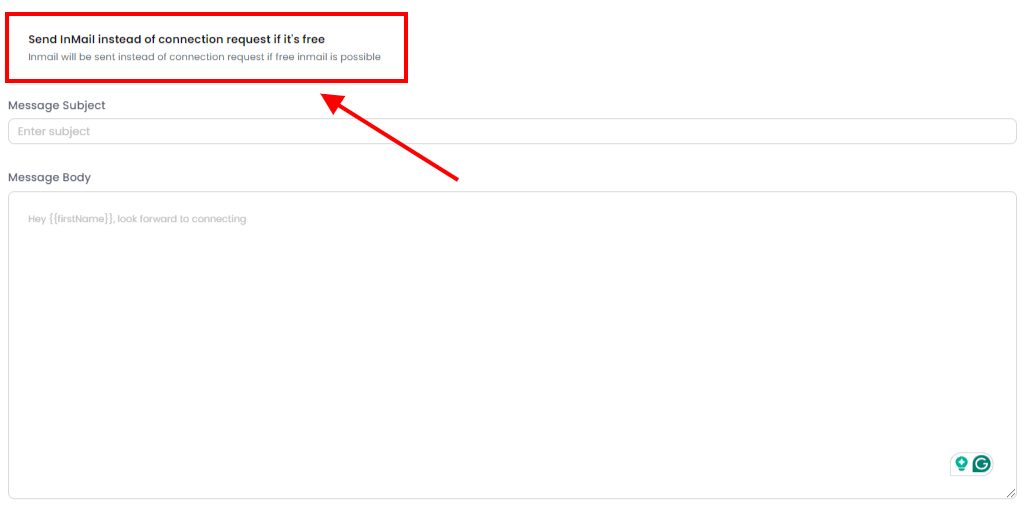
Outly will automatically send a free InMail instead of a connection request whenever it comes across an Open Profile among your leads list.
That way, it saves your InMail credit and the number of regular connection requests you can send while getting your pitch in front of many potential SQLs.
In addition, you can randomize the number of InMails sent daily and enable an option to gradually increase the number of InMails you send per day.

That way, Outly mimics normal human behavior to perfection so as not to raise any LinkedIn flags.
And there isn't a thing you can't customize: from the maximum daily number of InMail requests to the number by which Outly increases the requests and the frequency of increasing.
4. Engage with your prospects' content & profiles
One of the utmost staple points of hyper-personalized outreach is engaging with your prospects' profiles and content in a meaningful way.
There's nothing to better showcase your genuine interest in them than by giving their profiles some serious lovin'.
And there's no need for grand, over-the-top gestures, as that way, you'll seem too pushy and outright fake for your own good.
Less is often more.
So, what you could do to show interest and give attention to your prospects includes:
- Viewing a lead's profile - that's the very first step in showing interest while staying lowkey and not being obviously salesy;
- Following them - this is pretty self-explanatory, as it's another logical step in slowly building trust;
- Liking or commenting on their posts - no better way to meaningfully engage with their content than providing valuable feedback.
You can easily set up these actions in your campaigns in Outly to make sure your connection requests – and pitches later on – will be received more readily.
But let's be real about commenting.
Writing thoughtful comments on 50+ prospect posts every day? That's exhausting.
Most people skip it entirely. Or worse, they leave generic comments like "Great post!" that do nothing.
Outly's AI Commenting fixes this.
Here's how it works:
- The AI reads your prospect's post
- It writes a relevant, contextual comment
- The comment gets posted automatically
Why this matters is that when you finally send that connection request, they'll recognize your name.
You're not a stranger anymore. You're the person who left that thoughtful comment last week.
That's the difference between a 10% acceptance rate and a 40% one.
The goal is to nurture your connections.
5. Always follow up
Once you've connected with your leads, their journey through your sales funnel has only just begun.
That's why it is always a good idea to thank them or remind them of your humble existence before you hit them with an offer.
This becomes even more important when you consider that customer journeys frequently stretch over 6 months from the first anonymous touch to a won deal .
In fact, you could set up elaborate multi-step campaigns to make sure you never miss out on following up with a lead.
For example, Outly's smart-sequence feature allows you to set up triggers and as many steps as your specific sales process demands .
(we recommend 5 follow-ups max)
And once a lead responds, the automation will stop, allowing you to continue the conversation yourself.
And if your inbox gets a bit crowded , it's easy to oversee a potentially vital message from a warm lead who's on the brink of converting.
That's why having a smart inbox with a clear and uncluttered overview of everything you may need in one place always comes in handy.
Outly gives you access to a smart inbox at no extra cost.
6. Use a LinkedIn auto-connect tool to scale your outreach easily
And finally, although theoretically, you could do all of this manually and by the book .
But the truth is it would take you ages to actually reach all the potential prospects LinkedIn has to offer your business.
Imagine the time - and effort - it would take you to first find and then meaningfully engage with every single prospect in the way we've described.
We're not saying it's impossible.
But doing LinkedIn outreach 100% manually and with no extra help would be painstakingly slow and tedious as well.
So, if you're serious about scaling your LinkedIn outreach while keeping it hyper-personalized so that each prospect feels unique and like they especially matter to you, the truth is you'll need a hand with achieving it all.
That's where LinkedIn auto-connect tools step in.
It helps you do all the heavy lifting more easily and much faster than you would without them.
And yes, although they're not exactly in line with LinkedIn's official policies, if you use these tools wisely - and use the right kind of them - the risk of you being banned from LinkedIn won't be significantly higher.
Just make sure to stay respectful of other users.
Don't be spammy.
Do not send a ridiculously huge number of messages and requests per day.
Because that will be a blatant breach of LinkedIn's terms, and you wouldn't want that.
When it comes to the benefits of using LinkedIn automation tools , there are quite a few worth mentioning:
- Some of them offer ways of bypassing LinkedIn's weekly limits , so you can really scale your outreach and get to many more potential prospects than you would normally;
- You can create elaborate campaigns that will include showing initial interest in a prospect to connecting with them, initiating a chat, and following up with them;
- You can easily reach out to fellow group members as they're the folks most likely to be interested in your product or service. Just add all members of a given group in any given campaign, and you're set to go;
- Most have in-app analytics dashboards to help you track the stats on your overall performance and allow you to get to know your audiences better;

- They help make your prospecting more efficient as you'll be able to get lists of hot leads from more than just Sales Navigator searches, including targeting group members or people who've commented on a post, etc.

These are just some of our many features.
Of course, it goes without saying that the best way to see what it can do for you is by taking Outly for a test drive.-
Start a free 14-day trial and see what it can do for you.
No CC info needed. 😉
FAQ: Common LinkedIn Questions
When you delete a message on LinkedIn does the other person know?
No, LinkedIn doesn't notify the other person when you delete a message from your side of the conversation. However, they can still see the message in their own inbox unless they also delete it.
How to block a person on LinkedIn without opening their profile?
You can block someone directly from their message by clicking the three dots in your conversation, then selecting "Block [Name]". You can also go to Settings & Privacy > Visibility > Blocking and search for their name there.
If I block a person on LinkedIn will they know?
LinkedIn doesn't send a notification when you block someone, but they may notice they can't find your profile in search results or view your content anymore. Your name will appear as "LinkedIn Member" in previous conversations.
Can you create a LinkedIn company page without a personal profile?
No, you need a personal LinkedIn profile to create and manage a company page. LinkedIn requires this to verify the identity of company page administrators and maintain platform security.
Why is my LinkedIn link preview not working?
LinkedIn link preview issues can occur due to missing Open Graph tags on your website, cached data that needs refreshing, or LinkedIn's crawler being unable to access your content. Try using LinkedIn's Post Inspector tool to troubleshoot preview issues.
Conclusion
So, before you go, just a quick recap of all the crucial bits to keep in mind when doing hyper-personalized LinkedIn outreach on scale:
- Make sure your connection requests stand out from overcrowded inboxes - pay attention to all the important details you can find on a prospect's profile (or let an automation tool do the heavy lifting for you 😉).
- Send messages that will strike a chord with prospects - avoid anything that's too pushy, spammy or impersonal. Try to find common ground and make the chat revolve around them and their needs, and your response rates will soar in no time.
- Don't forget to use InMails to their full potential - they can sure come in handy when you need to contact profiles you're not yet connected with. Just remember to personalize them as well.
- Give your prospects' profiles & content some much needed loving and attention - that's pivotal for building rapport and lasting relationships that lead to more profits for you.
- Make a habit out of following up regularly - it's hectic out there, so making sure you're always on top of your prospects' minds is never a bad idea.
- Don't shy away from LinkedIn auto-connect tools - they can significantly leverage your overall outreach and help you reach more people more effectively in less time.
And why take just our word for it?
Sign up for a 14-day free trial and let Outly do all the heavy lifting for you.
P.S. No strings attached - you don't even have to provide your credit card info.
Wow your leads by cloning yourself and sending personalized videos and voice notes to each lead on LinkedIn.
If you don't reply to leads within 5 mins, your chances of converting them fall by 50%. Our AI replies on your behalf instantly! (and yes, you can train it)
Don't shoot in the dark. Get detailed analytics on what's working
Outly allows you to invite other team members, so that they can add their LinkedIn Account, run outreach campaigns and get amazing results just like you.