How can you build your target audience on LinkedIn? Step-by-Step Guide
Let’s start with an example; you are planning to start a business of stationery and related supplies. What would be your target audience in this case? Of course, students as will impact your sales by a significant amount, and they are the ones who are in search of these products.
Traditional methods of reaching out to your target audience are no longer seen nowadays; most business enterprises operate digitally. LinkedIn is one platform that provides the largest B2B professional network. LinkedIn can make things very easy for you whether you are looking for a job or want to expand your sales or network.
But the problem now is how can you find and reach out to your target audience? Apart from features offered by LinkedIn that can help you filter out the results, you can also use automation to easily build your target audience. Let’s discuss a few steps to build your target audience.
8 Steps To Build Your Target Audience On LinkedIn
1. Campaign Manager:
The campaign manager is one of the most popular methods to reach your target audience. Using the campaign manager, one can run and effectively manage ad campaigns to target people on LinkedIn.
To get started, you need to create a LinkedIn ad campaign account. Then, you need to set the objective, and then you have to provide information related to the audience that you want to target. Then you will see certain ad templates like images, message-based, carousel, text etc . Now let’s have a brief look at how it is to be done:
- Set the objective- You have to set a relevant goal for your campaign; it is an action you want people to take when they see your ad.
- Provide audience info- The second step is to provide information regarding the people you want to target, be it industry-oriented or professional based or even personal interests.
- Choosing ad format- You need to select the format in which your ad will be displayed, like carousel, image, text-based or message ads.
- Set the budget- You need to set the budget according to your strategy and campaign performance and then schedule the campaign.

2. Search using filters:
Using filters to search makes it even easier to set up desired criteria and search for results accordingly.
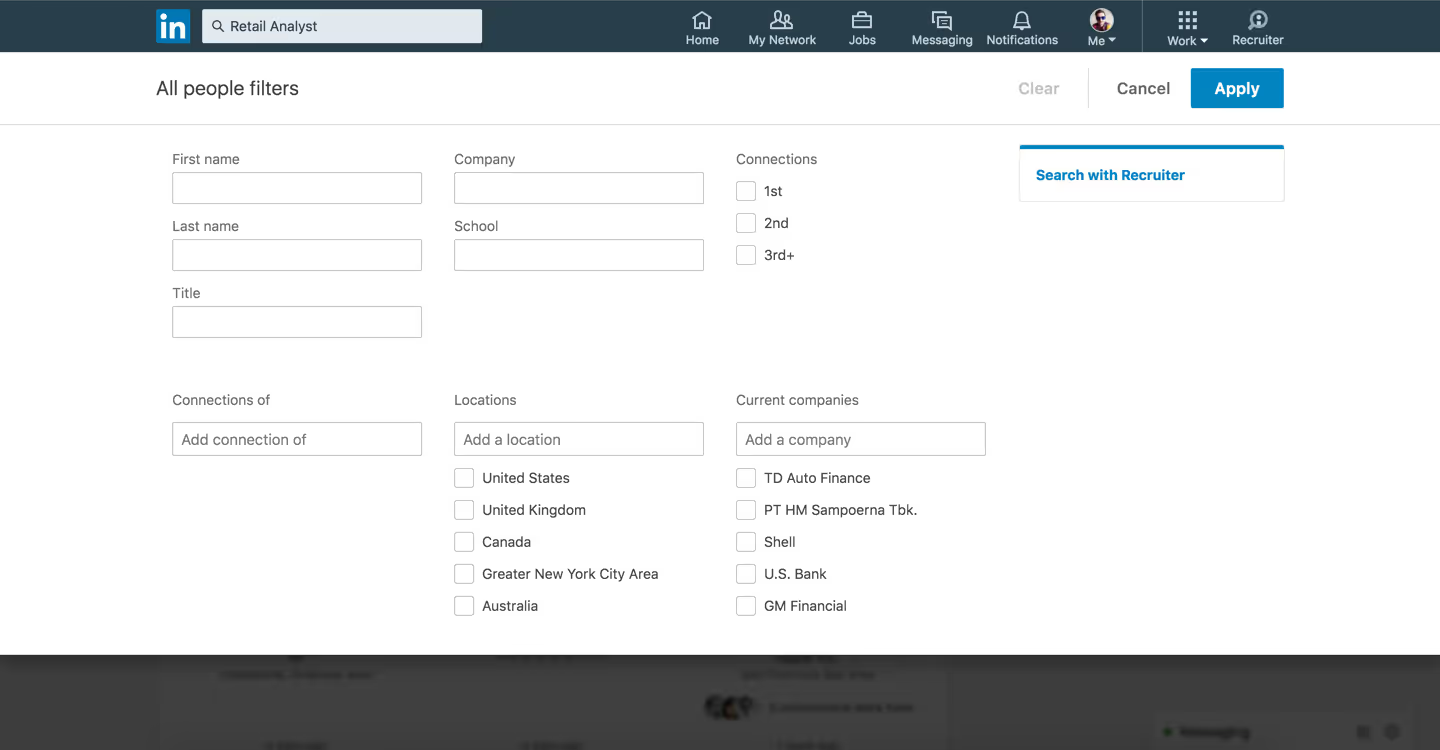
For example, if you are looking for a software firm, you just need to search this on the search tab, and then some criteria will be shown like jobs, people, posts, and companies. And from another option, you can set some advanced standards like location, industry, past and current company and many more.
Hence, using this manner, you can first search for the audience and add a sequence of filters to it so that you can reach out to them hassle-free.
You can also easily use Boolean search to find your target audience. Just add some quotation marks (“) and get going with the search . For example- “web development” will give you results that include both these words in it. This makes searching easier as well as more accurate. Moreover, you can use Outly to search for people based on criteria and send them LinkedIn connection requests in large volumes.
3. The connections of your competitors:
The people who follow your competitors are a treasure for you; they are a ready-made list of the target audience which can add a lot to your business . Since you and your competitors are providing the same products or services and if they have an open profile, these people can be converted into your customers very easily.
Competitor analysis is a good method to understand what strategies are working for them and how you can improve them. Moreover, by analyzing their connections, you will get an insight into the type of audience they are targeting and accordingly, you can also target those people with the same or better strategies.
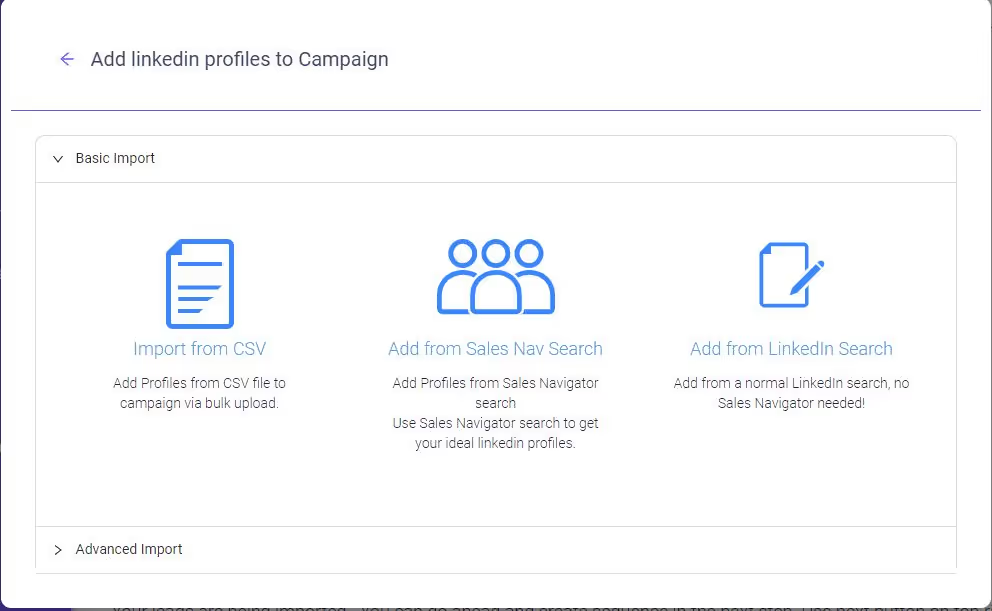
You can use Outly to reach out to the connections in a very easy way. Moreover, you can reach out to them in bulk and upload their data in the form of a CSV.
4. LinkedIn hashtags:
You can also use hashtags on your posts to get more engagement and also to attract new audiences. Hashtags are a great way to be found on LinkedIn. When you use relevant hashtags, it becomes easier for people to find your content, so they will start following you. Using trending hashtags on LinkedIn can help to get better connections; simultaneously, it will definitely help boost your connections.
You can also use an advanced LinkedIn search to find posts with certain hashtags and then engage with those people accordingly. Outly can also add relevant hashtags to your posts to increase engagement.
5. Participate in groups:
Groups are a great way to connect with professionals in the same industry; it’s like a community where people with similar interests come together and discuss things. The more you participate in groups, the more people will get to know about you. Become a part of the groups that are related to your business and tell people more about your product on this platform .
Then these groups can be used to get an audience for webinars or informative workshops so that people get an in-depth view of your company and what you offer in the market.
Outly can help you in finding relevant groups as per your interest and also engage with people in those groups using its various features like automated messages, intelligent automation, etc.
6. Attend the webinars:
It is not essential for customers only to attend; it is not crucial for customers only to attend webinars; as a marketer, you can also attend webinars to get an insight into the problems faced by people in your industry . Moreover, this will also help you in creating content that can attract your target audience. By doing this, you can also form a connection with the attendees of your industry and host your own webinars.
It would also provide you with insight regarding how many people you should target and how many of them will be interested in your business.
Pro tip - You can find good webinars through LinkedIn groups.
7. Use other platforms:
To build an audience, you can use other platforms like Instagram, Facebook, and Twitter. For example, you can use Twitter to connect with the people of your industry and accordingly pitch them. You can use ads to promote the product on these platforms also, and from the interactions on these platforms, you can redirect your audience to LinkedIn so that they can get a better idea of what you are offering.
8. Stay active on LinkedIn:
LinkedIn is a platform that provides you with a lot of opportunities to connect with your target audience. Detect the problems faced by people and design your posts according to the same. Also, talk about the things happening in your core industry. And if you have multiple accounts to manage, you can use Outly to engage with prospects; it does all this on automation, it can auto-follow the connections and provides all the insights and advanced statistics in a dashboard so that you can have a glance at where you are standing in your journey to build a target audience.
But how should you interact with the audience?
It’s time to nurture them!
You can perform various actions when you are connected or trying to connect with someone. Following are some:
- Send them messages
- Send emails
- Use Interactive content
- Engage with their content
- Always follow-up
Send them messages:
It is one of the most common ways to nurture your target audience, you can send them LinkedIn connection messages regarding various aspects, but one thing to note is don’t start talking about your product or service directly.
Another problem comes here, what if you want to reach out to a bulk audience at once, don’t worry every problem is followed by its solution. Using Outly, you can send messages that run on autopilot and reach out to people efficiently as it would be very hectic to message each of them. Outly does this on automation; you can also set a sequence of messages to be sent.
You can also use this tool to automate other tasks like sending LinkedIn connection requests, sending follow-ups etc. In addition to this, it can safely bypass the weekly connection limit of LinkedIn, which is 100/week. You also get a smart inbox to manage all the messages in a single place.
Send Emails:
When they are familiar with your business, you can send them emails regarding what you offer, as they would already have an idea of who you are through your LinkedIn message interaction. At this point, you can tell about your company or any other relevant topic related to the industry.
Here, you can also use Outly to effortlessly draft and send emails in a series and personalize them. You just need to set certain criteria related to the sequence of emails, and the rest will be done by Outly.
Use interactive content:
It would be pretty boring for your audience to look at your plain texts day by day, and they may lose interest in your business. To make the interactions more friendly and eye-catchy, you must use images or GIFs in your outreach.
Outly offers different options for personalization; you can effortlessly draft and send highly-personalized messages and connection requests in just a few clicks. You can use Images and GIFs in your messages or emails to make the interaction attractive. Moreover, you can also use readymade templates to draft emails or messages quickly and elegantly because our personalization options will provide you with an edge.
Engage with their content:
You should also engage with the content posted by your target audience, and like and comment on their posts; this will help you to interact with them regularly. People usually like it when someone takes an interest in their content and interacts with them; it makes them feel special and also helps in building a rapport. It would look rude that you are just sending them messages or emails regarding your product, and it sounds like you are not interested in their profile.
Putting such small extra efforts definitely leads to significant results, and one more thing to make you aware of is that you can easily set up these actions as steps in your campaigns in Outly to make sure your connection requests will be received more readily .
Always follow up:
Once you’ve connected with your leads, their journey through your sales funnel has only just begun.
That’s why it is always a good idea to thank them or remind them of your humble existence before you hit them with an offer.
In fact, you could set up elaborate multi-step campaigns to ensure you never miss out on following up with a lead.
For example, Outly’s smart-sequence feature allows you to set up triggers and as many steps as your specific sales process demands .
And once a lead responds, the automation will stop, allowing you to continue the conversation.
On the other hand, if your own inbox gets a bit crowded, it’s easy to oversee a potentially vital message from a warm lead who’s on the brink of converting.
That’s why having a smart inbox with a clear and uncluttered overview of everything you may need in one place always comes in handy.
Final Takeaways
Building your target audience is the first thing that has to be done if you are running a business. LinkedIn is an all-around platform that you can use to interact with the audience and generate leads. And here, you must stand out from other profiles, you can do unique things like posting unique content to set a good impression on your target audience, and they will automatically come to your profile.
Also, try to engage with as many people as you can, it will definitely help you, and if you are unable to reach out to a good number of people, then don’t be hesitant to use a LinkedIn automation tool as it would spark up your business from the very beginning.
Outly is one such tool that can be used to safely bypass LinkedIn limits and send messages, and connection requests, extracting information from different profiles and selecting the best data for you. LinkedIn ads can also be used to get an audience, but Outly provides better features than that at an affordable cost.
Wow your leads by cloning yourself and sending personalized videos and voice notes to each lead on LinkedIn.
If you don't reply to leads within 5 mins, your chances of converting them fall by 50%. Our AI replies on your behalf instantly! (and yes, you can train it)
Don't shoot in the dark. Get detailed analytics on what's working
Outly allows you to invite other team members, so that they can add their LinkedIn Account, run outreach campaigns and get amazing results just like you.