Note éditoriale : cette version française reprend la structure et les informations de la version anglaise, avec les références produit adaptées à Outly. La priorité SEO reste la version anglaise.
Messages de masse sur LinkedIn : comment passer à l’échelle en toute sécurité en 2026
À retenir :
Les messages de masse sur LinkedIn peuvent générer efficacement un volume important de leads, mais exigent une exécution rigoureuse pour éviter les restrictions de compte.
Utilisez des outils d’automatisation basés sur le cloud comme Outly pour une prospection plus sûre et personnalisée à grande échelle, et respectez toujours les règles de la Professional Community de LinkedIn afin de préserver la sécurité de votre compte.
Lisez ce blog…
Si vous en avez assez de passer un temps énorme à faire de la prospection à froid sur LinkedIn.
La prospection manuelle est en effet chronophage !
Je sais que créer du lien est essentiel pour tout le monde, que l’on soit dirigeant d’entreprise ou commercial, et LinkedIn est l’option la plus économique pour le faire.
Mais cela ne vaut rien si vous ne pouvez pas en tirer parti dès le départ.
Imaginez maintenant que vous puissiez entrer en contact avec des centaines de personnes sans le moindre effort.
Et pas avec n’importe qui, mais avec votre audience cible.
Vous vous demandez comment commencer ?
Vous êtes au bon endroit !
Les messages de masse sur LinkedIn peuvent vraiment changer la donne.
Vous ne voulez clairement pas passer à côté.
Dans ce blog, je vais vous montrer :
🎯 Comment envoyer des messages en masse sur LinkedIn sans prise de tête et générer des leads ?
🎯 Quels sont les types de messages que vous pouvez envoyer sur LinkedIn ?
Vous avez un emploi du temps chargé ? Aucun problème. Je vais vous apprendre :
🎯 Comment automatiser votre processus de messages de masse sur LinkedIn
Et répondre à quelques questions sur les messages de masse LinkedIn.
Je partagerai aussi mes modèles de messages de masse LinkedIn éprouvés, avec un taux de réponse de 20 %.
Assurez-vous de ne pas sauter cette partie, ou vous pourriez manquer quelques stratégies intéressantes pour améliorer votre présence sur LinkedIn.
C’est parti !
Que sont les messages LinkedIn ?
Le service de messagerie LinkedIn vous permet de contacter vos relations ou vos prospects.
Une fois connecté à quelqu’un, vous pouvez lui envoyer des messages ou l’inviter à rejoindre un groupe ou un événement.
C’est aussi une excellente façon de nourrir la relation après la mise en relation.
En réalité, répondre rapidement à un message peut laisser une impression positive.
Alors que LinkedIn ne vous permet d’envoyer gratuitement des messages qu’à vos relations de 1er degré , le service de messagerie peut envoyer des messages à n’importe quel utilisateur de la plateforme.
.avif)
Cela se fait souvent en envoyant un InMail à un autre utilisateur LinkedIn.
Cependant, ce service est réservé aux utilisateurs premium.
Types de messages LinkedIn
Il existe 3 types de messages LinkedIn que vous pouvez envoyer à vos relations.
Voyons cela en détail.
1. InMail
LinkedIn InMail est une fonctionnalité premium.
Si vous avez souscrit à un abonnement LinkedIn Premium, Sales Navigator ou Recruiter, cela vous permet d’envoyer un message direct à n’importe qui sur la plateforme, pas seulement à vos relations.
.avif)
InMails limités :
Cependant, ces offres comportent une limite sur le nombre d’InMails que vous pouvez envoyer chaque mois. Minimum 5 InMails par mois, maximum 150 par mois.
Les tarifs de Sales Navigator commencent à 99,99 $ par mois et incluent 50 messages InMail mensuels, ce qui en fait un outil puissant de prospection directe auprès de prospects en dehors de votre réseau.
À noter :
Vous pouvez envoyer un nombre illimité d’InMails aux utilisateurs ayant un profil ouvert, même s’ils ne font pas partie de vos relations de 1er degré (à condition qu’ils aient activé cette fonctionnalité).
Alors, comment savoir qui a activé cette option ?
Voici un guide complet pour trouver des profils ouverts sur LinkedIn !
{{mobile-cta}}
2. Messages sponsorisés
Les messages sponsorisés sont des publicités envoyées directement dans la boîte de réception LinkedIn de votre audience cible.
Il s’agit d’un service payant grâce auquel les utilisateurs LinkedIn envoient des messages de masse à leur audience cible.

Les messages sponsorisés sont identifiés comme « Sponsored Message » dans la boîte de réception du destinataire, ce qui réduit le taux de réponse.
Malgré cela, cela peut être un excellent moyen de faire de la prospection à grande échelle et de faire connaître votre offre rapidement. Vous pouvez cibler des groupes spécifiques et gagner du temps par rapport à une messagerie manuelle.
Il vous suffit de paramétrer le message, et LinkedIn fait le travail pour vous.
3. Messages de profil ouvert
Vous pouvez envoyer des messages aux personnes ayant un profil ouvert sous forme de demande de connexion.
Cependant, vous devez être en relation de 1er degré pour envoyer ces messages.
S’ils ont un profil ouvert, vous pouvez leur écrire sans être connecté.
Sinon, vous devez d’abord envoyer une demande de connexion.
Vous pouvez également associer cela à un message court pour de meilleurs résultats, ce qui peut augmenter votre taux d’acceptation.
Une demande de connexion bien rédigée montre que votre intérêt est réel, ce qui augmente les chances qu’elle soit acceptée.
Les messages de profil ouvert sont simples et excellents pour démarrer de nouvelles conversations.
Vous pouvez entrer en contact avec les personnes avec lesquelles vous souhaitez réellement échanger.
Maintenant que vous savez tout sur les messages LinkedIn et la manière dont ils peuvent vous aider, passons à la question principale qui vous intéresse : comment envoyer des messages en masse sur LinkedIn.
Comment envoyer des messages de masse sur LinkedIn ?
Le service de messagerie de masse LinkedIn est gratuit et simple à utiliser.
L’envoi de messages en masse peut se faire de deux façons pour aider votre entreprise à générer des leads :
👉 Sans utiliser d’outil d’automatisation LinkedIn
👉 En utilisant un outil d’automatisation LinkedIn
Vous vous demandez peut-être si votre compte peut être banni pour envoi de messages de masse.
Oui, une utilisation excessive de cette fonctionnalité peut entraîner les conséquences suivantes :
- Votre compte peut être signalé comme spam
- Des fonctionnalités peuvent être restreintes
- Dans les cas les plus graves, le compte peut être banni
Commençons par comprendre comment démarrer l’envoi de messages de masse sans outil d’automatisation.
Sans utiliser d’outil d’automatisation :
Je sais que vous vous posez cette question : « Peut-on envoyer un message de masse sur LinkedIn ? »
La réponse est : oui, c’est possible.
Voici comment procéder :
1. Ouvrir son compte LinkedIn
Vous devez d’abord ouvrir votre compte LinkedIn, ce qui affichera la page de votre profil ainsi que le tableau de navigation, comme illustré ci-dessous.
2. Ouvrir la boîte de réception LinkedIn
Après avoir ouvert votre boîte de réception, cliquez sur le bouton de rédaction d’un message, comme indiqué sur l’image.
.avif)
3. Rédiger un message
Si vous utilisez un modèle de message, collez-le dans la section « Rédiger un message ».
.avif)
Ajoutez tous les destinataires, c’est-à-dire la liste des personnes à qui vous souhaitez envoyer le message.
4. Cliquer sur Envoyer
Vous pouvez également ajouter une image, une vidéo ou un GIF pour rendre le message de masse plus attrayant visuellement.
Une autre façon d’envoyer des messages de masse sur LinkedIn consiste à utiliser un outil d’automatisation.
Mais d’abord, abordons le point qui fâche :
Pourquoi faudrait-il seulement envisager d’utiliser la fonctionnalité de messages de masse sur LinkedIn ?
Le message de masse est une pratique courante.
Il est utilisé à diverses fins, comme contacter des prospects ou transmettre des informations aux employés, etc.
Les outils d’automatisation LinkedIn donnent un avantage à ceux qui ne les utilisent pas, en particulier dans les métiers de la vente ou pour ceux qui utilisent LinkedIn pour rechercher des prospects B2B.
Cependant, avant d’utiliser ce service, vous devez comprendre en quoi il peut vous donner un avantage :
Les avantages
1. Les messages de masse vous font gagner du temps et de l’énergie
Les messages de masse sur LinkedIn vous font gagner du temps et de l’énergie, et les messages automatisés simplifient encore davantage le processus.
Au lieu d’envoyer les messages un par un, vous pouvez en envoyer plusieurs en une seule fois. Vous pouvez ainsi vous concentrer sur ce qui compte vraiment.
2. Pas de tâche répétitive
Les outils d’automatisation vous évitent la corvée de parcourir des centaines de profils chaque jour.
En quelques clics, vous pouvez générer des leads en volume sans effort.
À partir des filtres et des personnalisations que vous définissez, un outil d’automatisation envoie rapidement des messages aux prospects correspondant à vos critères, tout en veillant à ce que votre compte ne soit pas restreint ou banni.
Cela rend la génération de leads sur LinkedIn simple, tout en vous assurant d’obtenir des leads de qualité et vérifiés.
3. Personnalisation
LinkedIn insiste sur la personnalisation des messages adressés aux relations de 3e degré et plus afin qu’ils se sentent davantage concernés.
Vous pouvez inclure des informations pertinentes comme du travail bénévole ou les entreprises pour lesquelles ils ont travaillé.
Attendez, vous pensez à personnaliser vos messages manuellement ?
Cela se comprend quand on n’a pas à en envoyer des centaines chaque jour.
Mais si je vous disais qu’il existe un outil qui excelle dans :
✔️ La personnalisation créative et avancée
✔️ Les campagnes de messages automatiques
✔️ Les messages générés par IA à fort taux de conversion
✔️ Des modèles de messages soigneusement conçus
Eh bien, Outly est là pour vous sauver la mise lorsqu’il s’agit d’automatiser les messages LinkedIn avec une hyper-personnalisation.
Outly personnalise les messages à grande échelle.
Des messages qui gardent une touche personnelle.
Des messages qui convertissent des leads en clients.
.avif)
Les limites
Le message de masse est un outil marketing idéal, car il permet de générer instantanément des leads en volume et d’atteindre une large audience.
Cependant, tout n’est pas rose.
Il existe quelques inconvénients que vous devez connaître :
• Restriction de compte
LinkedIn favorise les interactions humaines, pas les outils automatisés.
LinkedIn restreint les comptes qui enfreignent ses règles de la Professional Community.
La plateforme interdit notamment l’utilisation de fonctionnalités d’invitation pour envoyer des messages promotionnels à des personnes que vous ne connaissez pas ou pour spammer d’autres utilisateurs. Utiliser des extensions Chrome ou des outils cloud bon marché peut donc entraîner la restriction de votre compte.
Risque avec les extensions basées sur Chrome :
Les extensions basées sur Chrome doivent être activées manuellement avant utilisation, ce qui signifie que LinkedIn peut facilement les repérer.
Mais il existe des outils cloud comme Outly, qui vous aident à éviter que LinkedIn ne restreigne votre compte.
Vous vous demandez pourquoi ? Eh bien, l’outil vous fournit une adresse IP dédiée afin que vous n’ayez pas à utiliser plusieurs comptes ni à envoyer une quantité massive de demandes de connexion depuis la même adresse.
Cette action aide à convaincre LinkedIn que vous êtes une vraie personne et non un bot, ce qui évite toute restriction de compte.
Il dispose également d’un mode de sécurité qui protège votre compte contre un bannissement ou une restriction.
.avif)
• Shadow ban
LinkedIn surveille de près le comportement des utilisateurs.
Si vous paraissez trop actif, vous pourriez subir un shadow ban.
Un shadow ban signifie que votre contenu ne sera pas visible par les autres, même s’il est optimisé.
Cela peut sérieusement nuire à la croissance de votre réseau et à votre portée.
Soyez donc prudent dans la manière dont vous utilisez les messages de masse.
La meilleure façon d’exploiter pleinement les messages de masse est de respecter les règles de LinkedIn et de privilégier des interactions pertinentes pour développer votre réseau.
• Messages mal rédigés
LinkedIn est une plateforme professionnelle. Les gens repèrent facilement un message issu d’un modèle. C’est pourquoi il est essentiel de rédiger un bon message à froid.
Le message de masse manuel échoue souvent parce qu’il ne paraît ni personnel ni humain.
Mais il existe une solution pour le rendre efficace.
Utiliser un outil d’automatisation comme Outly peut aider. Notre équipe personnalise chaque message pour le rendre unique.
%25252520(1).avif)
Cela signifie : fini les modèles génériques.
Oh, et avant d’oublier, nous proposons un essai gratuit de 14 jours, afin que vous puissiez tester avant d’adopter.
Et nous ne demandons pas vos informations de carte bancaire !
Qu’est-ce qu’un message LinkedIn automatisé ?
Les messages LinkedIn automatisés vous permettent de rédiger et planifier des messages pour plus tard.
C’est comme programmer un e-mail dans Gmail.
Ils aident à augmenter votre taux de réponse en générant des leads en volume.
Revenons maintenant aux messages de masse automatisés sur LinkedIn.
J’ai déjà expliqué comment fonctionne l’envoi de messages de masse sans outil d’automatisation.
Il est certain qu’il peut être pénible de passer des heures à faire des actions de prospection manuelles.
Mais est-ce la seule raison pour laquelle vous devriez utiliser des outils d’automatisation LinkedIn ?
Certainement pas ! Laissez-moi vous expliquer.
L’un des défis est la personnalisation.
Les messages de masse peuvent sembler moins personnels.
Cela peut entraîner un taux de conversion plus faible.
Pour prendre l’avantage sur les autres, vous devez personnaliser vos messages à grande échelle.
Et ce n’est PAS POSSIBLE pour un humain de le faire manuellement.
L’une des façons d’y parvenir est d’utiliser Outly.
Outly peut approcher vos prospects avec des messages personnalisés parfaitement rédigés. Il utilise pour cela notre toute nouvelle fonctionnalité AI Variables.
Et si vous êtes quelqu’un qui fait de la prospection manuelle, vous allez forcément adorer.
La variable IA est essentiellement un ensemble de prompts soigneusement conçus parmi lesquels vous pouvez choisir.
Une fois que vous en sélectionnez un qui correspond à votre style, l’IA analyse le profil LinkedIn du lead et utilise le prompt pour rédiger un message hautement personnalisé, donnant l’impression que vous avez passé des heures à étudier son profil.
Voici quelques exemples de ce que AI Variables peut faire :
- Faire référence à une publication récente qu’ils ont partagée pour ouvrir sur un sujet qui les intéresse déjà.
- S’appuyer sur leur parcours professionnel pour reconnaître leur expérience et montrer pourquoi c’est pertinent.
- Mettre en avant leur poste actuel ou une étape importante de leur entreprise pour prouver que vous avez fait vos devoirs.
- Mentionner une compétence ou une recommandation sur leur profil pour rendre le message plus spécifique.
- Relier le message à leur secteur d’activité afin qu’il parle directement à leur univers.
Le résultat est un message qui donne l’impression d’avoir été écrit uniquement pour cette personne — même si vous en envoyez des centaines.
Que se passe-t-il une fois la conversation lancée ?
Bonne question.
Dites bonjour à notre autre nouvelle fonctionnalité, le AI Inbox Manager :
Grâce à lui, Outly peut répondre automatiquement à vos prospects, réserver des rendez-vous sur votre calendrier avec vos clients idéaux et créer des campagnes multicanales.
Le tout en pilote automatique.
Vous pourriez appeler cela de la sorcellerie, mais chez Outly, c’est un mardi comme un autre.
Avec le AI Inbox Manager, vous arrivez en rendez-vous avec des personnes qui ont déjà suivi une vraie conversation de découverte, au lieu de leads froids qui se souviennent à peine de votre message initial.
C’est comme avoir une équipe SDR à temps plein qui ne dort jamais, ne se laisse jamais submerger par les refus émotionnellement, et peut gérer des centaines de conversations simultanément.
Votre outil d’automatisation se charge d’ouvrir la conversation, et l’IA se charge de transformer ces échanges en rendez-vous.
Mais que faire si votre prospect n’est pas convaincu et soupçonne que vos messages ont été rédigés par IA ?
Ce n’est pas impossible, n’est-ce pas ?
Ce n’est cependant pas un problème avec Outly , car nous vous offrons la possibilité d’enregistrer votre voix personnalisée ou un message vidéo afin d’ajouter cette touche humaine supplémentaire à vos campagnes.
Outly vous permet aussi de personnaliser des images et de créer des GIF hyper-personnalisés et accrocheurs qui vous aident à vous démarquer du flot de messages privés ennuyeux.
.avif)
Si vous êtes arrivé jusqu’ici, vous voudrez évidemment en savoir plus sur les outils d’automatisation, n’est-ce pas ?
Et cela nous amène à la section suivante —
Automatisez le processus avec des outils d’automatisation LinkedIn
Tout d’abord, sachez ce que vous visez.
Essayez-vous de recruter des personnes, générer un maximum de leads, faire connaître votre produit, ou peut-être de prospecter des investisseurs ?
Définir votre objectif est essentiel.
Cela détermine qui vous ciblez et la manière dont vous rédigez ces messages.
Une fois cela clarifié, Outly rend la suite très simple.
Tout repose sur la configuration de votre campagne en quelques clics , puis vous êtes prêt à envoyer vos messages en masse.
Et le plus intéressant, c’est que vous pouvez également envoyer des messages de masse à vos relations de 2e et 3e degré sur LinkedIn, ce que vous ne pouvez pas faire sans outils d’automatisation.
Voici comment utiliser Outly pour envoyer des messages de masse sur LinkedIn :
- Connectez-vous à votre compte Outly et cliquez sur Créer une campagne.
Si vous n’avez pas encore de compte, inscrivez-vous pour un essai gratuit de 14 jours avec simplement votre e-mail !

- Ensuite, vous pouvez soit personnaliser votre propre campagne, soit répondre à quelques questions et en créer une à l’aide de SalesGPT.

-
Vous avez plusieurs options pour importer vos leads, comme la recherche Sales Nav, la section des commentaires, et bien plus encore (ce qui signifie que vous pouvez également inclure vos relations de 2e et 3e degré).
-
Une fois cela fait, vous pouvez configurer votre campagne comme vous le souhaitez et définir votre séquence.
En fonction de votre séquence, Outly relancera vos destinataires pour qu’ils ne manquent pas votre message 😉
Et voici la partie la plus sympa : vous pouvez inclure LinkedIn + e-mail dans la même campagne !
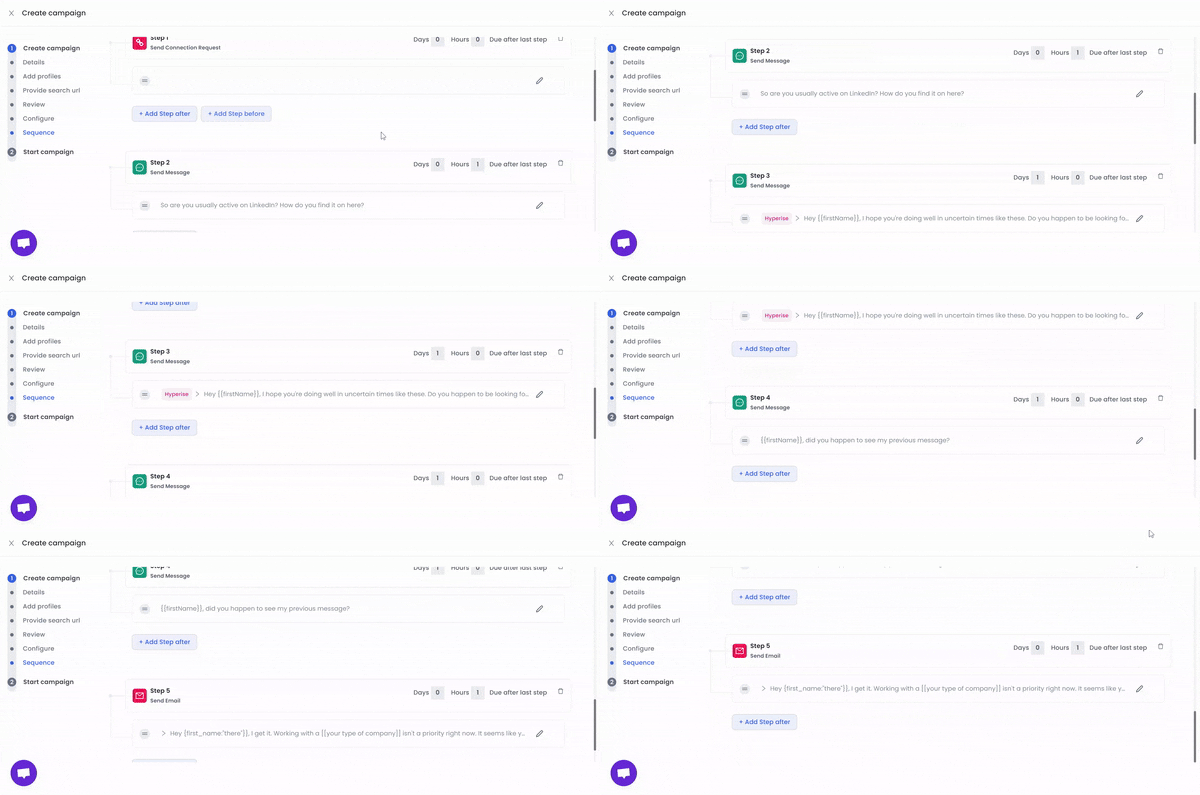
C’est bon ?
Félicitations !
Vous pouvez maintenant lancer votre campagne.
Et si vous vous demandez : « En quoi est-ce plus sûr que l’autre option ? »
Voici pourquoi :
💣 Nous disposons d’un mode de sécurité intégré qui garantit que votre automatisation paraît plus humaine et moins robotique.
💣 Vous pouvez aussi définir des limites pour éviter que votre automatisation ne parte en roue libre.
Quels sont les différents types d’outils de messagerie de masse LinkedIn ?
Il existe 2 grands types d’outils de messagerie de masse LinkedIn :
- Les extensions de navigateur
- Les outils basés sur le cloud
Extensions de navigateur
Les extensions de navigateur sont moins chères que les solutions cloud, mais elles ont aussi leur coût.
Les extensions de navigateur ont leurs inconvénients, qui en font une mauvaise option pour l’automatisation LinkedIn. Voici pourquoi :
⚠️ Elles sont loin d’être aussi sûres que les logiciels cloud car les bots LinkedIn peuvent les détecter plus facilement, ce qui peut entraîner une restriction de votre compte.
⚠️ Elles ne fonctionnent que lorsque votre appareil est allumé.
⚠️ Elles n’utilisent pas d’adresses IP statiques. Les IP dynamiques (qui changent en permanence) peuvent laisser des traces, ce qui facilite la détection de l’automatisation par LinkedIn et peut potentiellement faire bannir définitivement votre compte.
Outils cloud
Les outils basés sur le cloud, en revanche, constituent un type plus récent et plus avancé d’outils de messagerie de masse LinkedIn.
Ils offrent de nombreux avantages, notamment :
✅ Ils sont généralement plus sûrs, car il y a peu ou pas de risque qu’ils soient détectés par les bots LinkedIn.
✅ Ils ne nécessitent pas que votre appareil reste allumé en permanence pour fonctionner, ce qui leur permet de travailler 24 h/24 et 7 j/7.
✅ Ils ne provoquent ni ralentissements ni bugs.
✅ Contrairement aux extensions Chrome, ils peuvent exécuter des campagnes de prospection automatisées en pilote automatique.
Les outils cloud sont globalement plus coûteux que les extensions de navigateur (après tout, la sécurité a un prix.)
Pourquoi utiliser des outils d’automatisation LinkedIn ?
Les outils d’automatisation LinkedIn sont utilisés à diverses fins. Ces outils automatisent des tâches spécifiques sur la plateforme, notamment :
- La collecte d’e-mails et de numéros de téléphone
- L’envoi de demandes de connexion pour augmenter votre réseau LinkedIn
- Les réponses de suivi automatisées à tout le monde afin de maximiser le taux de réponse
- Les services LinkedIn premium comme LinkedIn InMail
- Le lancement de campagnes LinkedIn
- Les actions de prospection à froid multicanales
Voici où Outly peut intervenir pour faire passer vos actions au niveau supérieur.
Avec une base de plus de 4100 clients, il peut vous aider à envoyer des messages à 100 prospects hautement qualifiés par jour tout en contournant en toute sécurité les limites de LinkedIn et en générant des leads de qualité en volume.
Ce n’est pas tout.
Une fois inscrit, vous pouvez envoyer 50 demandes de connexion par jour depuis votre profil et envoyer des messages de relance à vos nouvelles relations après avoir défini un planning.
Tout cela sans passer une minute sur LinkedIn !
L’outil d’automatisation détecte automatiquement une réponse du prospect, à partir de laquelle vous pouvez poursuivre la conversation.
La plupart de nos utilisateurs obtiennent jusqu’à 5 à 10 leads qualifiés chaque mois.
Vous vous demandez quoi faire si votre prospect n’est pas sur LinkedIn ?
Outly gère aussi ce cas. Dans la même séquence, vous pouvez le cibler par e-mail à froid et amorcer des conversations.
Et si vous vous dites : « Tout cela doit coûter une fortune… »
Ce n’est pas le cas.
Cela commence à $197 par mois et évolue selon vos besoins.
Meilleurs modèles de messages de masse en 2026
Votre message doit capter l’attention immédiatement.
Passons rapidement en revue mes techniques testées et approuvées pour accélérer vos résultats sur LinkedIn.
L’astuce du lien « commun » dans la messagerie LinkedIn
Voici une stratégie intéressante : rédigez un message qui mentionne un ami ou un groupe en commun. Cela crée immédiatement un lien avec votre lecteur.
Bien sûr, cela réduit votre liste de prospects à ceux avec lesquels vous avez déjà un lien indirect, mais vous obtiendrez un bien meilleur taux de réponse pour cette raison.
Limitez-vous à demander une introduction ou une recommandation — cela fait des merveilles.
Voici un exemple rapide de formulation :
Bonjour,
{La relation commune} et moi discutions hier de {sujet pertinent}, et votre nom est revenu dans la conversation. Je me suis dit que nous devrions entrer en contact.
Toujours agréable de rencontrer d’autres personnes qui travaillent aussi sur {nom du sujet}. Si cela vous dit, j’aimerais beaucoup échanger quelques idées cette semaine.
Au plaisir de vous lire,
[Votre nom]
Envoyer un message à un recruteur
Voici un modèle pour vous aider à entrer en contact avec un recruteur potentiel :
Bonjour {{nom du recruteur}},
J’ai entendu beaucoup de bien de l’entreprise, de la culture de travail saine qu’elle entretient et de toutes les initiatives qu’elle a prises dans le domaine de {{mentionner le secteur}}. J’aimerais beaucoup entrer en contact avec vous et en apprendre davantage sur le processus de recrutement.
Merci !
{{nom}}
{{coordonnées}}
L’approche directe
Vous cherchez à vendre votre service à un client potentiel ? Eh bien, il vaut mieux éviter de tourner autour du pot.
Vous devez être très prudent, car ces messages pourraient être ignorés et pris pour des e-mails de prospection à froid.
Hey {{prénom}},
Je ne suis peut-être pas vendeur de colle, mais j’ai tendance à tenir mes promesses. 😂
C’est en tout cas ce que mes clients disent après que je les ai aidés à résoudre {{mentionner les points de douleur}}.
J’aimerais beaucoup échanger avec vous et voir si nous pouvons faire quelque chose pour propulser votre entreprise vers de nouveaux sommets.
Vous pouvez consulter d’autres modèles éprouvés ici, qui peuvent considérablement renforcer votre stratégie de messagerie et vous aider à établir des liens plus efficacement.
Psst… vous pouvez vous abonner à notre liste de diffusion pour recevoir par e-mail les meilleurs modèles de messages de nos 3 meilleurs clients (ne vous inquiétez pas… nous ne spamons pas.)
Conclusion
Voilà, vous savez maintenant ce que sont les messages de masse et comment ils peuvent vous aider à prendre une longueur d’avance pour toucher un grand nombre de personnes.
Un outil d’automatisation comme Outly vous permet de conserver une approche personnelle tout en touchant beaucoup de monde. Vous pouvez aussi assurer les relances sans effort.
Et il ne s’agit pas seulement d’envoyer beaucoup de messages. Outly propose aussi toute une série d’autres fonctionnalités intéressantes à des prix qui ne feront pas pleurer votre portefeuille.
Cela vous semble utile ?
Contactez-moi si vous souhaitez voir comment cela peut fonctionner pour votre entreprise.
Je serais ravi d’échanger, et le café est pour moi 😉
D’ici là, à bientôt !
Émerveillez vos prospects en clonant votre approche et en envoyant des vidéos et notes vocales personnalisées à chaque lead sur LinkedIn.
Si vous ne répondez pas aux leads dans les 5 minutes, vos chances de conversion chutent de 50 %. Notre IA répond instantanément à votre place ! (et oui, vous pouvez l’entraîner)
Ne tirez pas à l’aveugle. Obtenez des analyses détaillées de ce qui fonctionne
Outly vous permet d’inviter d’autres membres de votre équipe afin qu’ils puissent ajouter leur compte LinkedIn, lancer des campagnes de prospection et obtenir d’excellents résultats, tout comme vous.