Note éditoriale : cette version française reprend la structure et les informations de la version anglaise, avec les références produit adaptées à Outly. La priorité SEO reste la version anglaise.
Comment trouver des anciens élèves sur LinkedIn ? [3 façons différentes]
À retenir :
Trouvez des anciens élèves sur LinkedIn grâce à trois méthodes : l’outil Alumni intégré sur les pages d’établissement, la recherche avancée de LinkedIn avec des opérateurs booléens, ou les plus de 50 filtres de recherche de Sales Navigator.
Prenez contact de manière stratégique avec des messages personnalisés mentionnant des expériences communes afin d’ouvrir des opportunités de réseautage, de conseils de carrière et de recommandations pour des emplois.
Vous pensez renouer avec d’anciens amis et collègues en 2026 ?
C’est excellent pour votre réseau et votre carrière.
Et LinkedIn vous facilite beaucoup la tâche, parce qu’aujourd’hui tout le monde est sur LinkedIn, mais de manière... plus professionnelle.
Vous pouvez donc les retrouver très facilement.
Je vais vous parler de 3 façons simples de rechercher les anciens élèves de votre école ou université sur LinkedIn et de la manière dont vous pouvez les contacter plus efficacement.
Efficacement ?
Comment peut-on « contacter » plus efficacement ?
Patience, on en parlera... dans un instant. ;)
Alors, si vous êtes prêt... prenez votre café et c’est parti !
3 façons de faire une recherche d’anciens élèves sur LinkedIn en 2026
Chacun d’entre vous peut avoir une raison différente de rechercher ses anciens élèves sur LinkedIn.
Certains ont besoin de conseils de carrière, d’autres recherchent davantage d’opportunités, et d’autres encore veulent simplement prendre des nouvelles !
Quelle que soit votre raison — voici 3 façons de procéder.
1. Utiliser l’outil Alumni de LinkedIn
Le premier endroit que vous devriez consulter est l’outil Alumni de LinkedIn.
👉🏼Tout ce que vous avez à faire est d’aller sur la page de votre école/université sur LinkedIn.
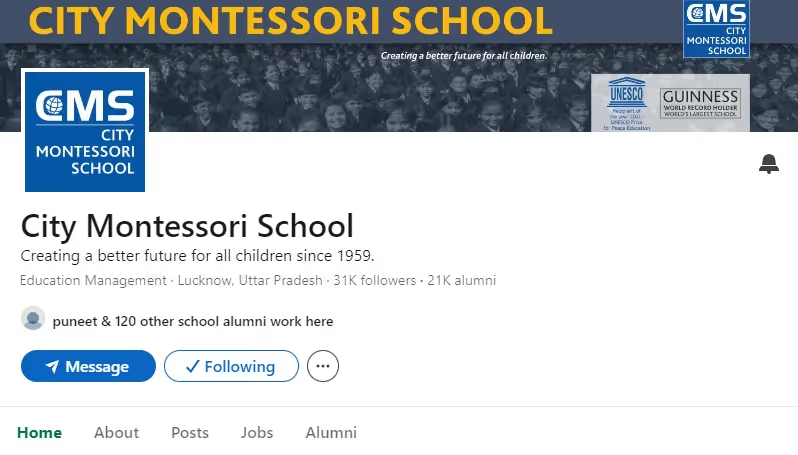
👉🏼Cliquez sur 'Alumni.'
👉🏼Voici ce que vous obtenez :
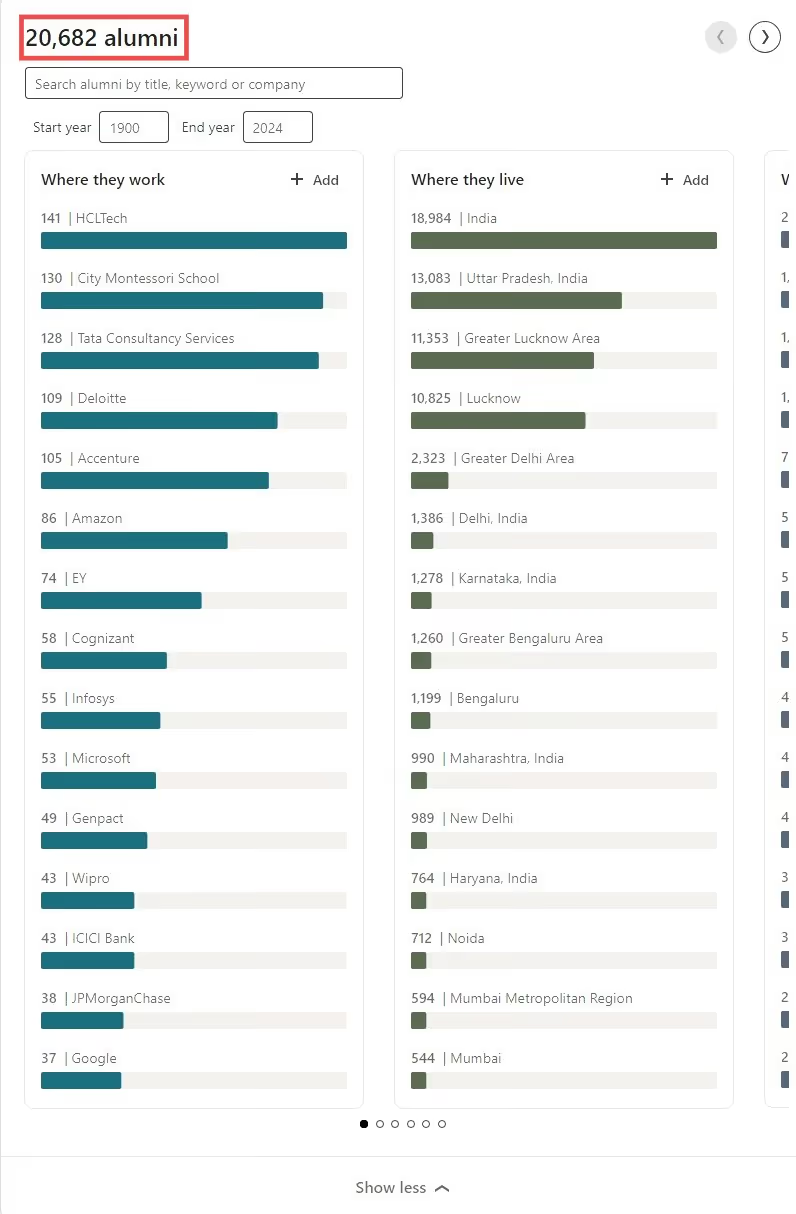
L’onglet Alumni sur les pages d’établissement de LinkedIn fournit des informations de haut niveau sur les anciens élèves d’une école, ainsi qu’un accès à des profils professionnels plus détaillés qu’ils ont partagés. Ici, vous pouvez également rechercher des personnes selon leur intitulé de poste, un mot-clé ou leur entreprise.
Donc, si quelque chose vous vient à l’esprit, il suffit de le rechercher !
Une fois que vous aurez filtré les personnes selon vos préférences, elles apparaîtront dans la section 'People you may know' ci-dessous.
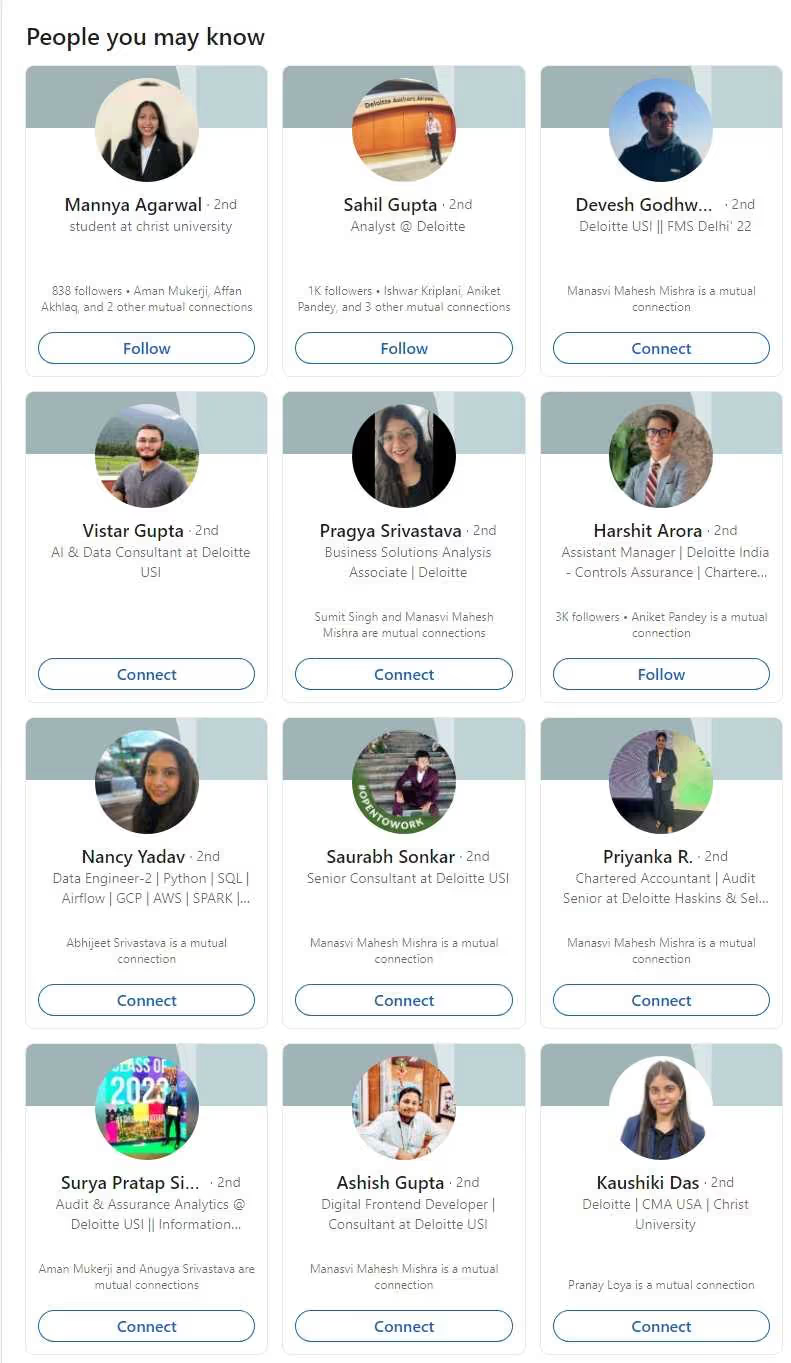
Une fois que vous les avez trouvées, vous pouvez cliquer sur leur profil pour en savoir plus sur elles, vous connecter avec elles et leur parler.
2. Utiliser la recherche LinkedIn avec des opérateurs booléens
Vous pouvez utiliser la recherche LinkedIn de manière similaire et trouver très facilement les anciens élèves de votre école et de votre université.
Si vous recherchez des personnes et des groupes dans lesquels la plupart des anciens élèves restent actifs, alors cette méthode pourrait vous convenir davantage.
👉🏼Allez dans la recherche LinkedIn et, en utilisant la recherche booléenne LinkedIn, tapez ceci dans la barre de recherche : <nom de l’école/université> AND alumni.
L’opérateur "AND" garantit que LinkedIn combine à la fois le nom de l’université et le mot-clé "alumni" dans vos résultats de recherche, rendant votre recherche plus ciblée.

👉🏼Maintenant, choisissez si vous voulez voir les groupes ou les personnes.
Par exemple, j’ai sélectionné les personnes et j’ai obtenu ceci :

Une fois que vous avez vos résultats de recherche, vous pouvez envoyer des invitations à se connecter aux personnes ou rejoindre des groupes pertinents. Vous pouvez aussi rechercher "[Nom de l’école] Alumni" dans les groupes LinkedIn et rejoindre les communautés d’anciens élèves pertinentes liées à votre université.
3. Utiliser les filtres de recherche avancée de Sales Navigator
Sales Navigator est un outil payant mais très efficace de LinkedIn pour filtrer très rapidement les personnes pertinentes.
Et vous pouvez toujours vous inscrire à l’essai gratuit ! LinkedIn propose généralement un essai gratuit de 30 jours aux nouveaux utilisateurs pour découvrir ses principales fonctionnalités. 😉
C’est aussi très simple à utiliser, avec plus de 50 filtres de recherche avancés.
Oui, plus de 50.
C’est largement suffisant pour filtrer vos anciens élèves.
Utilisez le filtre'School' pour trier les personnes selon leur école ou université, et vous pouvez **utiliser d’autres filtres comme*'Company,' 'Geography,'*** et bien d’autres pour cibler les personnes plus efficacement !
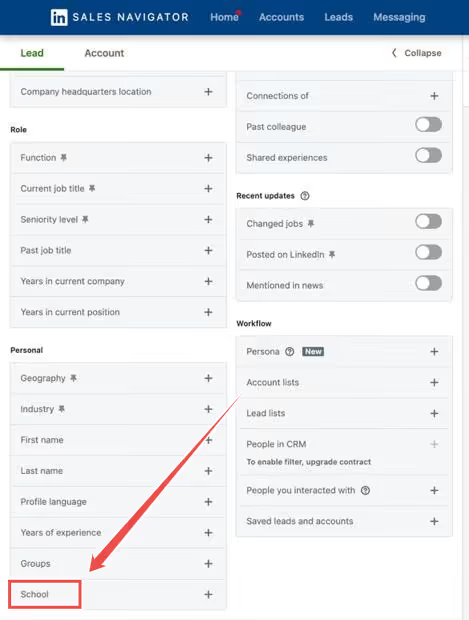
Et ce n’est pas tout.
Vous pouvez filtrer les personnes par entreprise actuelle, ancienne entreprise, lieu, établissement, et bien plus encore.
Cela permet d’obtenir des résultats beaucoup plus ciblés. Sales Navigator offre des capacités de filtrage nettement supérieures à celles des comptes LinkedIn gratuits, qui ne disposent que de 18 options de filtrage.
Pourquoi devriez-vous trouver et contacter des anciens élèves sur LinkedIn
Lorsqu’il s’agit de construire un réseau professionnel solide, LinkedIn peut être un outil puissant.
Mais il existe sur la plateforme un groupe de personnes qui peut donner un sérieux coup de boost à votre carrière — vos anciens élèves.
Voici pourquoi se connecter avec des anciens élèves sur LinkedIn est bien plus qu’un simple bonus :
Développer son réseau (évidemment !)
L’un des avantages les plus évidents de contacter des anciens élèves est la possibilité d’élargir votre réseau.
Les réseaux d’anciens élèves sont souvent extrêmement solidaires, avec des personnes prêtes à entrer en contact avec d’autres diplômés de leur établissement.
Ces relations ne se limitent pas aux personnes de votre domaine.
Vous serez surpris par la diversité des professionnels issus de secteurs variés, prêts à offrir des conseils, à collaborer ou simplement à partager leur expérience.
En plus, c’est toujours agréable de prendre des nouvelles !
Idéal pour des conseils de carrière et du mentorat
Les anciens élèves comprennent souvent les difficultés des premières étapes de votre carrière parce que vous savez... ils sont passés par là.
Cela en fait d’excellentes personnes pour obtenir des conseils de carrière, et beaucoup d’anciens élèves sont aussi ouverts au mentorat.
Alors, que vous cherchiez des conseils pour une transition professionnelle ou simplement quelqu’un avec qui échanger, les anciens élèves sont d’excellents interlocuteurs et peuvent vous orienter dans la bonne direction.
Davantage d’opportunités d’emploi
Évidemment !
Les réseaux d’anciens élèves sont le moyen le plus simple d’obtenir plus d’opportunités d’emploi, rapidement.
Beaucoup d’anciens élèves préfèrent même recruter des personnes issues de leur propre réseau et partagent souvent des offres d’emploi entre eux.
En vous connectant avec des anciens élèves, vous pouvez tomber sur des offres qui ne sont pas publiées ailleurs, et vous pourriez même recevoir une recommandation qui vous donnera un avantage dans le processus de recrutement. ;)
De plus, les personnes du secteur déjà familiarisées avec les programmes de votre établissement auront probablement davantage confiance en votre parcours.
Apprendre de leur expérience
Les anciens élèves sont la preuve vivante des chemins que votre carrière peut emprunter — et ils ont des histoires et des leçons à l’appui.
Qu’il s’agisse d’éclairages sur le travail dans certains secteurs ou de conseils sur la manière de gravir les échelons (ou de gérer un changement de carrière), les anciens élèves peuvent offrir une sagesse que vous ne trouverez ni dans les manuels ni dans les articles en ligne.
Cela vous aidera à accélérer votre propre carrière et à éviter certains obstacles qu’ils ont eux-mêmes rencontrés.
Et puis, ils sont beaucoup plus faciles à aborder de toute façon, non ?
Qu’il s’agisse d’un professeur en commun, d’un endroit préféré sur le campus ou simplement de l’expérience d’avoir fait partie du même environnement académique, vous pouvez entrer directement dans une conversation autour de vos expériences communes, et cela semblera automatiquement plus naturel et moins transactionnel.
Maintenant que tout est clair, parlons de la manière dont vous pouvez les contacter plus efficacement sur LinkedIn.
Comment trouver des clients sur LinkedIn et entrer en contact avec des anciens élèves
Vous avez terminé vos recherches et êtes prêt à entrer en contact avec des personnes de votre passé ?
Voici ce que vous devez faire maintenant —
✅ Faites des recherches très, très approfondies.
Vous les connaissiez à un moment, mais ce n’est plus le cas aujourd’hui.
Assurez-vous d’être au courant de leur situation actuelle lorsque vous commencez à rédiger un message pour eux.
Et si vous ne trouvez pas d’informations à jour, il vaut mieux le mentionner dès le départ et leur demander comment ils vont.
Conseil supplémentaire : gardez aussi votre profil à jour, afin que s’ils l’ouvrent pour le consulter, il ne donne pas l’impression d’être un autre spam.
✅ Commencez par une introduction, s’il vous plaît.
Comme je l’ai dit, il n’est pas certain qu’ils se souviennent de vous maintenant, il vaut donc mieux vous présenter à l’avance pour éviter toute confusion plus tard.
Vous pouvez même commencer à interagir avec leur fil LinkedIn pour créer du lien ; ils pourraient vous reconnaître et vous écrire en premier !
✅ Si vous les contactez dans un but précis, dites-le.
Si vous avez un objectif en tête — vous connecter avec quelqu’un qu’ils connaissent, leur demander d’essayer votre produit, ou autre — faites-leur savoir.
N’évitez pas le sujet pour le dire plus tard et finir par paraître bizarre.
✅ Relancez.
Si vous n’avez pas de réponse de leur part, il y a de fortes chances que votre message se soit perdu quelque part dans leur boîte de réception.
Avant de commencer à vous sentir ignoré, relancez-les et suivez cette checklist du point #1 pour vous assurer qu’ils vous reconnaissent !
N’ayez pas peur de relancer.
Vous voulez des exemples ?
Modèles de messages personnalisés pour contacter des anciens élèves
Voici trois modèles de messages différents que vous pouvez utiliser lorsque vous entrez en contact avec des anciens élèves :
Modèle #1 : Quand vous voulez simplement entrer en contact
Faire partie de [Nom de l’université] donne toujours l’impression d’emporter un morceau de chez soi partout où l’on va. J’aimerais beaucoup vous contacter et en savoir plus sur votre parcours depuis [université], [nom]. Restons en contact !
Modèle #2 : Quand vous voulez apprendre d’eux
Il y a quelque chose de particulièrement inspirant dans le fait de voir des anciens élèves de [Nom de l’université] accomplir des choses incroyables ! Votre travail dans [secteur/domaine] a retenu mon attention, [nom], et j’aimerais beaucoup entrer en contact avec vous et apprendre de votre expérience.
Modèle #3 : Quand ils sont proches et que vous voulez prendre contact
Bonjour [Nom] ! J’ai vu que nous sommes tous les deux anciens élèves de [Nom de l’université] et actuellement basés à [Lieu]. Ce serait super de faire connaissance entre anciens élèves ici.
Maintenant, si votre objectif était de prendre contact avec 4 à 5 personnes, allez-y et envoyez-leur des invitations à se connecter.
Mais si vous souhaitez contacter beaucoup de personnes sur LinkedIn, le faire manuellement peut sembler épuisant et accablant, ce qui est le cas, honnêtement.
Alors, que peut-on faire ?
Voici ce que vous pouvez faire..
Utilisez un outil d’automatisation LinkedIn comme Outly .
Outly peut automatiser l’envoi d’invitations à se connecter (avec des messages personnalisés) à plusieurs personnes simultanément.
Tout ce que vous avez à faire est de créer une campagne et de copier-coller vos résultats de recherche dans Outly .
👉🏼 Inscrivez-vous à l’essai gratuit , allez sur la page des campagnes et créez une nouvelle campagne.
👉🏼Si vous êtes familier avec les outils d’automatisation LinkedIn, vous pouvez cliquer sur 'I'm an advanced user' ou bien créer une campagne avec SalesGPT.
👉🏼Maintenant, choisissez la manière dont vous avez effectué votre recherche, copiez-collez le lien, et c’est réglé !
👉🏼Vous pouvez maintenant définir votre planning, de la façon dont vous voulez que votre campagne fonctionne du début à la fin ; et Outly assurera aussi les relances !
Trouver des profils ouverts sur LinkedIn devient plus facile avec ces outils d’automatisation, car ils peuvent vous aider à identifier quels profils sont accessibles sans restrictions premium et à prioriser votre prospection en conséquence.
Conseils sur les liens LinkedIn et l’optimisation du profil
Lorsque vous contactez des anciens élèves, assurez-vous que votre profil LinkedIn vous présente de manière professionnelle. Il peut arriver que vous rencontriez des problèmes de liens LinkedIn lorsque vous partagez votre profil ou votre contenu. Si votre lien LinkedIn ne fonctionne pas correctement, vérifiez que votre profil est complet, avec une photo professionnelle, un titre accrocheur et une section expérience à jour.
Votre profil constitue votre première impression lorsque des anciens élèves cliquent pour en savoir plus sur vous avant d’accepter votre invitation à vous connecter. Un profil bien optimisé, avec un bon fonctionnement du lien LinkedIn, peut considérablement améliorer votre taux d’acceptation des demandes de connexion.
Foire aux questions
Comment trouver un profil LinkedIn à partir d’un e-mail ?
Vous ne pouvez pas rechercher directement quelqu’un sur LinkedIn à l’aide de son adresse e-mail via la recherche standard de la plateforme. En revanche, vous pouvez essayer d’ajouter son e-mail à vos contacts puis vérifier les suggestions « Personnes que vous pourriez connaître » de LinkedIn, ou utiliser la fonction « Connecter » si vous avez son e-mail dans votre carnet d’adresses. Certains outils tiers proposent également des services de correspondance entre e-mail et profil LinkedIn.
Peut-on trouver efficacement des clients sur LinkedIn ?
Oui, LinkedIn est excellent pour trouver des clients. Utilisez les filtres avancés de Sales Navigator pour cibler vos prospects par secteur, taille d’entreprise, intitulé de poste et localisation. Interagissez d’abord avec leur contenu, puis envoyez des invitations à se connecter personnalisées. Concentrez-vous sur la construction de relations plutôt que sur des argumentaires de vente immédiats pour obtenir de meilleurs résultats.
Conclusion
Se connecter avec des anciens élèves est un moyen simple et sans stress d’élargir votre réseau LinkedIn et d’ouvrir de nouvelles portes pour votre carrière.
Et quelle meilleure plateforme que LinkedIn pour le faire ?
Vous disposez d’outils précis pour identifier vos anciens élèves, et le meilleur dans tout ça : vous pouvez tout automatiser !
N’oubliez pas de respecter les règles et de ne pas devenir trop familier lorsque vous écrivez à quelqu’un après une très longue période.
Bon réseautage ! 🙂
Prenez soin de vous.
Épattez vos prospects en clônant votre profil et en envoyant des vidéos et notes vocales personnalisées à chaque prospect sur LinkedIn.
Si vous ne répondez pas aux prospects dans les 5 minutes, vos chances de conversion chutent de 50 %. Notre IA répond instantanément à votre place ! (et oui, vous pouvez la former)
Ne tirez pas à l’aveugle. Obtenez des analyses détaillées sur ce qui fonctionne
Outly vous permet d’inviter d’autres membres de votre équipe, afin qu’ils puissent ajouter leur compte LinkedIn, lancer des campagnes de prospection et obtenir d’excellents résultats, tout comme vous.