Note éditoriale : cette version française reprend la structure et les informations de la version anglaise, avec les références produit adaptées à Outly. La priorité SEO reste la version anglaise.
Top 5 des alternatives à Salesgear pour une prospection plus efficace
À retenir :
Salesgear présente des limites, comme l’arrêt des campagnes en cas de déconnexion de la boîte de réception et des données de contact obsolètes.
Parmi les meilleures alternatives, on retrouve Outly pour l’automatisation LinkedIn ($197/mois), Amplemarket pour les grandes listes de prospects ($600/mois) et SalesLoft pour une solution d’engagement complète (tarifs personnalisés).
Salutations, professionnels de la vente !
Salesgear est un choix assez populaire pour l’automatisation de vos actions de prospection sortante, mais ce n’est clairement pas le meilleur.
Il propose des séquences pratiques, de la prospection multicanale et une base de contacts B2B. Alors pourquoi cherchons-nous des alternatives à Salesgear ?
Eh bien… si vous l’avez utilisé, vous savez qu’il présente aussi quelques gros défauts. Par exemple :
💔 les boîtes de réception déconnectées qui interrompent vos campagnes d’e-mailing (après tout, pourquoi se priver du suspense de savoir si votre message est arrivé dans la boîte de réception de votre prospect ? 🫣),
💔 les données de contact obsolètes qui vous font perdre du temps (rien de tel que contacter des personnes qui n’existent plus ! 🤷),
ou 💔 les options de recherche de contacts limitées qui rendent difficile la recherche d’un contact précis dans une séquence (parce que chercher une aiguille dans une botte de foin, c’est tellement amusant 😑).
Ne vous inquiétez pas : il existe des alternatives à Salesgear capables de faire passer votre prospection commerciale au niveau supérieur. Voici :
- Outly
- Amplemarket
- SalesLoft
- ZoomInfo SalesOS
- Saleshandy
Ces cinq outils peuvent vous aider à surmonter les faiblesses de Salesgear. Ils offrent :
⭐ des informations prospects en temps réel,
⭐ des workflows commerciaux automatisés,
⭐ une meilleure précision des données, et
⭐ une communication plus efficace avec vos prospects.
Alors, détendez-vous et prenez votre boisson préférée.
Ne laissez plus Salesgear vous freiner.
Explorons les options qui s’offrent à vous et voyons à quel point ces outils peuvent transformer votre processus commercial.
Mais avant de plonger dans les alternatives à Salesgear, faisons un rapide rappel sur Salesgear.
Qu’est-ce que Salesgear et à quoi sert-il ?
Salesgear est une plateforme d’engagement commercial B2B. Elle propose des fonctionnalités de séquencement multicanal (SMS, téléphone, e-mail et LinkedIn), facilite les relances personnalisées et augmente l’engagement des prospects.
Alors, où Salesgear montre-t-il ses limites, et pourquoi avons-nous besoin d’alternatives ?
Voyons cela dans la section suivante.
Pourquoi avez-vous besoin d’alternatives à Salesgear ?
- Si un utilisateur déconnecte sa boîte de réception, les campagnes e-mail s’arrêtent jusqu’à la prochaine date d’étape. Cette fonctionnalité peut interrompre rapidement les campagnes, et cela peut être frustrant pour les utilisateurs.
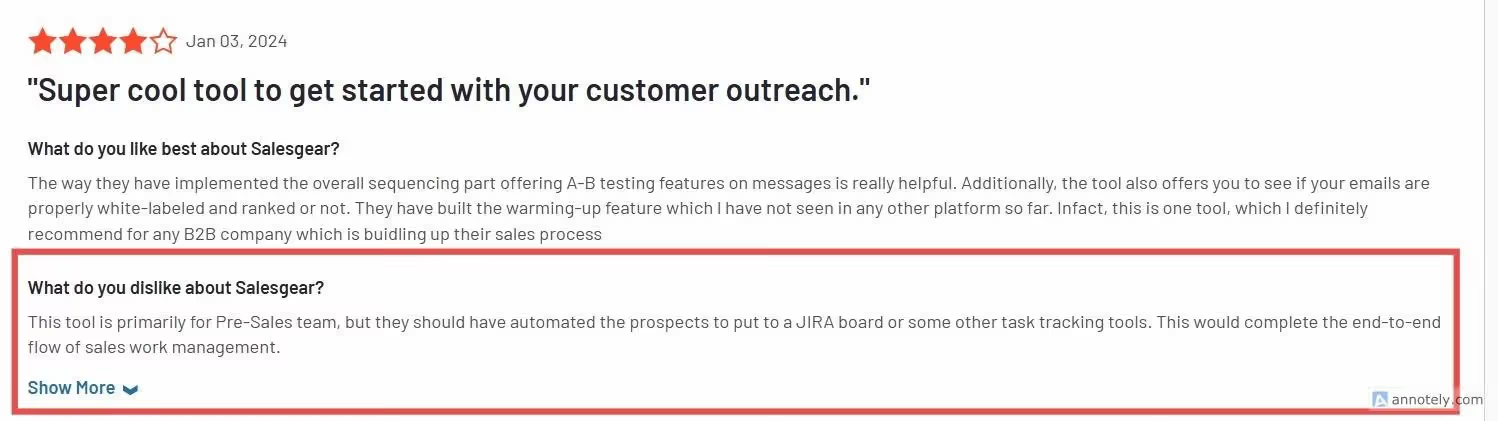
- Ils ont également besoin d’améliorations en matière de suivi des e-mails.
- La qualité des données de contact est globalement bonne, mais les contacts obsolètes ne sont pas rares. Cela peut faire perdre du temps et potentiellement coûter des opportunités commerciales aux utilisateurs.
- Il est difficile de trouver un contact précis dans une séquence. La seule option de recherche est l’adresse e-mail.

- Les utilisateurs ne peuvent pas supprimer les données en masse depuis les tâches.
- Même si l’outil est plutôt bon, il a besoin d’améliorations sur le plan des intégrations. Des utilisateurs ont signalé des bugs du produit provoquant des problèmes.

Maintenant que nous savons ce que Salesgear propose et ce qu’il lui manque, déterminons son coût.
Quel est le modèle tarifaire de Salesgear ?
Voici les offres tarifaires proposées par Salesgear :
- Gratuit : vous obtenez 50 envois d’e-mails, 60 minutes d’appels, et vous pouvez envoyer jusqu’à 1 000 e-mails par mois, ce qui n’est honnêtement pas énorme.
- Basic : 49 $ par mois ; 1 200 crédits e-mail, 25 000 envois d’e-mails et 100 minutes d’appels.
Comme son nom l’indique, il s’agit d’une offre assez basique, donc si vous débutez, vous pouvez l’envisager.
-
Pro : 99 $ par mois ; 4 000 crédits e-mail, 50 numéros de téléphone et 100 000 envois d’e-mails
-
Pro Plus : 199 $/mois, 10 000 crédits
Voilà pour les offres tarifaires de Salesgear. Mais si vous voulez les vraies bonnes fonctionnalités, il faudra mettre la main au portefeuille.
Récapitulons rapidement les inconvénients de Salesgear :
- La déconnexion de la boîte de réception interrompt les campagnes e-mail
- Problèmes de suivi des e-mails
- Données de contact obsolètes
- Options de recherche de contacts limitées
- Problèmes du côté des intégrations
- Bugs
Passons maintenant au plat principal : nous avons rassemblé pour vous les meilleures alternatives à Salesgear. En commençant par le grand favori… (roulement de tambour)… Outly ! 🎉
{{mobile-cta}}
Alternative n°1 à Salesgear : Outly, pour plus de personnalisation, une meilleure boîte de réception et des fonctionnalités de prospection
Outly est une plateforme innovante conçue pour simplifier et améliorer vos processus commerciaux grâce à la prospection automatisée sur LinkedIn et par e-mail, ainsi qu’à des stratégies pilotées par l’IA.
Dans la suite, nous allons découvrir les fonctionnalités d’Outly qui en font un outil révolutionnaire dans le secteur de l’engagement commercial.
Quelles sont les fonctionnalités qui font d’Outly un incontournable face à Salesgear ?
Les avantages d’Outly sont les suivants :
- Avec Outly, vous pouvez continuer à travailler pendant qu’il automatise vos tâches.
Les campagnes sont personnalisables selon vos consignes, ce qui permet une prospection personnalisée, une planification adaptée et une automatisation performante.
-
Avec Outly, les administrateurs peuvent suivre les performances de l’équipe commerciale tout au long du processus de prospection. De plus, les analyses de campagne sont simples à utiliser et précieuses.
-
Outly s’intègre à LinkedIn Sales Navigator, expert en collecte et en mise à jour des données de prospects. Vous n’avez donc plus à vous soucier des informations incorrectes.
-
Outly propose aussi une option directe de recherche par nom pour vos séquences de campagne, afin que vous puissiez trouver n’importe quel prospect à tout moment.
-
Avec l’aide de Zapier, Outly s’intègre efficacement à de nombreux outils pour fluidifier vos efforts de prospection.
-
Outly continue d’évoluer pour offrir une meilleure expérience utilisateur, raison pour laquelle la nouvelle interface est très simple et facile à utiliser.
Outly dispose aussi d’autres fonctionnalités notables ; voyons-les.
Comment Outly vous aide-t-il à rationaliser votre prospection commerciale ?
-
Prospection multicanale : Outly utilise LinkedIn et l’e-mail pour répondre à vos besoins de prospection. Il soutient vos efforts via des sondages LinkedIn, des groupes, des InMails et des messages privés.
-
Outly est également configuré pour sécuriser votre compte. Vous pouvez donc prospecter sans craindre d’être banni.
-
Vous avez la possibilité de lancer des campagnes d’automatisation de manière séquentielle et de les modifier selon vos besoins. Vous pouvez choisir la méthode, le timing et les modèles pour la prospection.
-
Hyper-personnalisation : il utilise également Hyperise pour intégrer des GIFs/images personnalisés afin de donner plus d’impact à vos messages.
-
Vous pouvez envoyer des messages vocaux/vidéo dans le cadre de votre prospection personnalisée.
-
Vous pouvez utiliser l’Assistant de prise de rendez-vous IA, qui répondra aux prospects en votre nom.
-
Une autre fonctionnalité unique d’Outly est l’enrichissement d’e-mails personnels. Vous pouvez l’utiliser pour vérifier les adresses e-mail de vos prospects via la base de données d’Outly.
-
Outly dispose d’une boîte de réception intelligente pour centraliser toutes vos conversations au même endroit.
-
Le support client d’Outly ne dort jamais — tout comme vos ventes ! Outly offre un excellent support client 24 h/24 et 7 j/7.
-
Leur modèle de similarité vous permet de trouver en moins de 30 secondes des prospects correspondant à votre ICP actuel.
Si vous manquez de temps pour interagir vous-même avec chaque prospect, l’Assistant de prise de rendez-vous IA d’Outly prend le relais pour parler à votre place.
Il apprend votre ton, échange naturellement avec les leads et fait avancer la conversation jusqu’à ce qu’ils réservent un rendez-vous.
Quels sont les inconvénients d’Outly ?
- Au départ, il y a une courbe d’apprentissage, mais vous pouvez résoudre vos difficultés avec l’aide d’un support client compétent.
- Outly se concentre davantage sur la prospection LinkedIn et l’automatisation que sur l’e-mail.
Tout en proposant toujours l’automatisation des e-mails, l’outil donne la priorité à LinkedIn en raison de sa capacité prouvée à générer davantage d’engagement de la part des clients potentiels, garantissant ainsi que vos efforts de prospection visent juste à chaque fois 🎯.
Voyons maintenant combien Outly facture pour les fonctionnalités qu’il propose.
Combien coûte Outly ?
Les tarifs d’Outly reposent sur des forfaits fixes. La facturation annuelle inclut 2 mois offerts.
Professional : $197/mois ($164.17/mois en facturation annuelle) 3 000 analyses de profils IA par mois, messages hyper-personnalisés, workflows personnalisés avec embranchements, LinkedIn et email dans une même séquence, notes vocales et vidéo, un accompagnement à la prise en main et un support prioritaire.
Elite : $347/mois ($289.17/mois en facturation annuelle) Tout ce qui est inclus dans Professional, plus des prospects IA illimités, les réponses autonomes aux campagnes IA, les imports de contacts autonomes et les étapes vocales et vidéo illimitées.
Enterprise : tarifs personnalisés Limites, workflows et intégrations sur mesure, avec un onboarding premium mené par un CSM pour les grandes organisations.
Chaque offre inclut un essai gratuit de 14 jours. Consultez la page tarifs pour les détails à jour.
Alternative n°2 à Salesgear : Amplemarket, pour de meilleurs modèles et séquences
Amplemarket vous débarrasse des tâches fastidieuses de la vente grâce à des fonctionnalités comme :
- la prospection automatisée,
- la messagerie personnalisée, et
- les analyses en temps réel.
Il peut devenir un véritable allié pour vous aider à développer votre activité et à atteindre vos objectifs commerciaux.
Voyons maintenant pourquoi il s’agit d’une des alternatives à Salesgear.
Quels sont les points forts d’Amplemarket par rapport à Salesgear ?
Les avantages d’Amplemarket sont les suivants :
-
La possibilité d’importer de grandes listes de prospects et de créer des séquences réactives : vous pouvez créer des séquences réactives destinées à des listes cibles.
-
Intuitif et facile à utiliser : la fonction de recherche est une caractéristique marquante qui permet aux utilisateurs de trouver facilement des prospects.
-
Modèles personnalisables : les modèles personnalisables d’Amplemarket vous permettent d’envoyer des séquences pertinentes aux prospects.
-
Importations par lots depuis les “Lead Lists” directement depuis LinkedIn Navigator et Salesforce : cette fonctionnalité rend les activités de prospection et de suivi beaucoup plus efficaces.
Nous avons expliqué ce que les utilisateurs apprécient chez Amplemarket.
Quelles autres fonctionnalités notables Amplemarket propose-t-il ?
Voici les bonnes fonctionnalités d’Amplemarket :
-
L’équipe du support client est compétente et attentive aux besoins des clients.
-
Le lead scoring pour vous aider à vous concentrer sur les prospects les plus prometteurs.
-
La fonctionnalité d’enrichissement des contacts.
-
Vous pouvez personnaliser les modèles d’e-mails à l’aide de balises.
-
L’outil utilise l’IA et le machine learning pour de meilleurs rappels de suivi.
-
Et le dialer sortant.
Il est maintenant temps de découvrir ce que les utilisateurs n’aiment pas dans l’outil.
Quels sont les problèmes courants rencontrés par les utilisateurs d’Amplemarket ?
Les inconvénients d’Amplemarket sont les suivants :
-
Interface complexe : les utilisateurs trouvent difficile de localiser des fonctionnalités précises et doivent passer du temps à les rechercher.
-
Problèmes de chargement de la barre latérale : les utilisateurs doivent changer de page pour la recharger, ce qui peut être frustrant et faire perdre beaucoup de temps.
-
Difficultés de délivrabilité des e-mails : il existe toujours un risque que vos e-mails finissent dans le dossier spam du destinataire.
-
Fonctionnalités limitées : Amplemarket manque de plusieurs fonctionnalités, notamment la possibilité de modifier les données de leads, de suivre les interactions sur les pages web et de définir une demande automatique de connexion à nouveau.
-
Le prix est élevé : ce serait formidable qu’Amplemarket puisse proposer une remise ou une période d’essai pour les entreprises en phase de démarrage.
-
Limitations et problèmes d’intégration : l’outil ne prend pas en charge les intégrations avec Zapier et des utilisateurs ont signalé des problèmes avec son intégration à Hubspot.

Passons maintenant au modèle tarifaire qu’Amplemarket propose sur son site — ou à son absence.
Combien coûte l’utilisation d’Amplemarket ?
- Startup : 600 $/mois en annuel, comprend 2 utilisateurs, 30 000 contacts et des fonctionnalités de base.
- Growth : tarifs personnalisés, comprend 4 utilisateurs, 280 000 contacts et des fonctionnalités supplémentaires comme l’onboarding personnalisé et Duo AI Voice.
- Elite : tarifs personnalisés, comprend 10 utilisateurs, 1 000 000 de contacts et toutes les fonctionnalités disponibles, y compris Duo AI Inbox.
Les offres Growth et Elite proposent davantage de contacts, d’utilisateurs et de fonctionnalités avancées par rapport à l’offre Startup.
Vous devez contacter l’entreprise pour obtenir les tarifs précis des formules Growth et Elite.
Les offres tarifaires d’Amplemarket sont un peu trop élevées. Si vous souhaitez en savoir plus sur Amplemarket, simplifions-nous la vie avec notre avis détaillé.
Passons maintenant à la troisième alternative à Salesgear : ZoomInfo SalesOS.
Alternative n°3 à Salesgear : ZoomInfo SalesOS, pour une meilleure organisation
ZoomInfo SalesOS est une plateforme d’engagement commercial. Elle est axée sur les séquences commerciales, le suivi des e-mails et le reporting, ce qui peut aider les équipes commerciales à automatiser et optimiser leurs efforts de prospection.
Nous allons maintenant nous concentrer sur les fonctionnalités qui sont bien accueillies par les utilisateurs.
Quelles sont les fonctionnalités clés de ZoomInfo Sales OS qui le rendent meilleur que Salesgear ?
Les avantages d’utilisation de ZoomInfo Sales OS sont les suivants :
-
Alertes en temps réel : ZoomInfo fournit des alertes en temps réel sur les signaux d’intention d’achat, comme les visites de site web, les téléchargements de contenu et les changements de poste.
-
Sujets d’intention : son intégration à Salesforce permet aux utilisateurs d’automatiser le démarrage d’une campagne et d’en suivre le succès.
-
Organigrammes et informations de contact : cet outil offre une grande richesse d’informations sur les clients, ce qui rend la prospection plus facile à gérer.
-
Sales Flow : ZoomInfo Sales permet aux utilisateurs de regrouper des clients potentiels et d’envoyer une série d’e-mails appelée Sales Flow.
-
Les filtres de recherche avancés aident à affiner les prospects cibles.
Quelles autres fonctionnalités impressionnantes ZoomInfo Sales OS propose-t-il ?
- ZoomInfo SalesOS fournit des recommandations de leads efficaces basées sur l’historique de recherche et les préférences de l’utilisateur.
- Le lead scoring et le marketing basé sur les comptes.
- La création d’automatisations de workflow est pratique avec Sales OS.
- L’outil propose des formations en ligne.
- Il dispose également d’une extension Chrome.
Les fonctionnalités sont intéressantes, mais qu’en est-il du revers de la médaille ? Voyons cela dans la partie suivante.
Quels sont les points à améliorer de ZoomInfo Sales OS ?
Voici les inconvénients de ZoomInfo Sales OS pour lesquels les utilisateurs peuvent chercher une alternative à ZoomInfo :
-
Problèmes d’intégration : parfois, l’intégration échoue ou génère des doublons, ce qui freine les campagnes. Et souvent, les données récupérées sont obsolètes.
-
Lourd et complexe : ZoomInfo Sales OS peut être difficile à apprendre et à comprendre, surtout pour les personnes non techniques.
-
La clause de renouvellement automatique : les utilisateurs ont déjà fait l’expérience de cette clause de renouvellement automatique sournoise, avec des exigences de notification ridicules.
-
Fonctionnalités limitées : en mode engage, les utilisateurs ne peuvent enregistrer qu’un appel ou envoyer/terminer un e-mail individuellement et ne peuvent pas choisir les deux et les envoyer en même temps.
-
Logiciel coûteux et support client médiocre : ZoomInfo Sales OS peut être prohibitif pour certains utilisateurs, et les tarifs semblent plus élevés pour la plupart des fonctionnalités de base.
-
Pas adapté aux PME : structure tarifaire élevée, fonctionnalités complexes pouvant submerger les petites équipes, et existence d’alternatives plus abordables spécialement conçues pour les petites entreprises ayant des besoins moins complexes.
Les clients ont également signalé n’obtenir que peu ou pas d’aide pour résoudre leurs problèmes.
Nous arrivons maintenant à la partie tarifs. Spoiler : nous n’avons pas non plus trouvé les tarifs de ZoomInfo sur leur site.
Quel budget prévoir pour ZoomInfo Sales OS ?
Les offres tarifaires de ZoomInfo ne sont pas indiquées sur leur site, ce qui est dommage. Cependant, l’outil propose un essai gratuit.
ZoomInfo propose trois offres tarifaires personnalisables, à savoir :
- Sales
- Marketing
- Talent
Les offres tarifaires de ZoomInfo Sales OS sont confuses. Avec leurs limites, elles ne constituent pas forcément un bon rapport qualité-prix.
La suivante est l’avant-dernière des alternatives à Salesgear : SalesLoft.
Alternative n°4 à Salesgear : SalesLoft, pour un meilleur suivi et de meilleures séquences
SalesLoft est une plateforme d’engagement commercial qui permet aux équipes commerciales de :
- Créer et exécuter des campagnes e-mail,
- Suivre l’engagement, et
- Recevoir des alertes lorsque les prospects effectuent des actions spécifiques.
SalesLoft vise à aider les équipes commerciales à accroître leur productivité et à générer davantage de revenus.
Découvrons les fonctionnalités de SalesLoft qui impressionnent le plus les utilisateurs.
Quelles sont les fonctionnalités phares de SalesLoft par rapport à Salesgear ?
Les avantages d’utilisation de SalesLoft sont les suivants :
-
Cadences : personnalisez les séquences de prospection en fonction de différentes campagnes ou des étapes du processus commercial.
-
Intégration avec Salesforce et d’autres CRM : vous pouvez garder toutes les informations de vos clients au même endroit. Et éviter la duplication des données tout en fluidifiant le processus de vente.
-
Analyses : vous pouvez obtenir des informations sur votre processus commercial grâce à des rapports détaillés et à des visualisations de données. Vous pouvez aussi utiliser le tableau de bord analytique pour analyser les appels. Découvrez combien de temps vous avez parlé par rapport au prospect.

- Suivi des e-mails : vous pouvez suivre les ouvertures de vos e-mails et les clics sur les liens pour obtenir des informations sur l’engagement de vos e-mails.
- Personnalisation : vous pouvez utiliser les paramètres de groupe pour modifier le processus d’automatisation selon les services ou les campagnes.
Passons aux autres fonctionnalités de SalesLoft.
Quelles autres fonctionnalités de SalesLoft sont intéressantes ?
-
SalesLoft propose une sécurité de niveau entreprise pour protéger les données commerciales sensibles.
-
L’outil aide aussi les équipes commerciales à identifier des insights et à coacher leurs commerciaux pour être plus efficaces dans leur prospection.
-
Il propose des capacités de gestion du pipeline et de prévision.
-
SalesLoft utilise également l’IA pour les prévisions.
Maintenant que nous connaissons ses fonctionnalités, il est temps de découvrir aussi ses limites.
Quels sont les problèmes de SalesLoft qui nécessitent une attention particulière ?
Les inconvénients d’utilisation de SalesLoft sont les suivants :
- Le nouveau tableau de bord est encombré par trop d’informations, ce qui rend difficile l’accès aux informations prioritaires.

-
Synchronisation limitée entre SalesLoft et Salesforce - les tâches et les journaux d’appels ne sont pas correctement enregistrés dans Salesforce.
-
Plantages du logiciel et nécessité de redémarrer votre ordinateur


- Support client peu fiable : alors que vous êtes peut-être déjà préoccupé par les problèmes mentionnés ci-dessus, imaginez qu’aucun membre de leur équipe ne vienne vous aider à les résoudre !
- Processus de séquence lent et compliqué avec importation manuelle laborieuse des contacts.

Les offres tarifaires sur le site officiel de l’outil continuent de décevoir. SalesLoft propose uniquement les fonctionnalités et la possibilité de réserver une démonstration de l’outil.
Peut-être que leurs développeurs sont occupés à construire une calculatrice pour cela !
Quel est le prix de SalesLoft ?
Selon des sources du secteur, il existe un contrat annuel. Une licence SalesLoft par utilisateur et par an coûte 2 000 $, soit 125 à 165 $ par utilisateur et par mois, selon le forfait.
Seules les fonctionnalités de prospection se situent dans la fourchette basse. Aucun minimum de sièges.
Et nous voici à la dernière des alternatives à Salesgear : Saleshandy. C’est la dernière, mais elle propose de bonnes fonctionnalités. Voyons cela dans la section suivante.
Alternative n°5 à Salesgear : SalesHandy, pour une interface simple et une meilleure automatisation
SalesHandy est un outil de prospection par e-mail froid et d’engagement commercial conçu pour aider les équipes à automatiser, suivre et déployer à grande échelle leurs campagnes e-mail.
Si vous cherchez une alternative à Salesgear qui se concentre principalement sur la prospection par e-mail, SalesHandy peut être un choix solide.
Qu’est-ce qui rend Saleshandy meilleur que Salesgear ?
SalesHandy mise tout sur l’automatisation des e-mails, le suivi et l’analyse pour vous aider à améliorer les taux d’ouverture et l’engagement. Voici quelques-unes de ses fonctionnalités remarquables :
- Séquences d’e-mails automatisées
Mettez en place des campagnes e-mail en plusieurs étapes avec des relances déclenchées en fonction du comportement du destinataire (ouvertures, clics ou réponses).
- Suivi des e-mails et analyses
Recevez des notifications en temps réel lorsqu’un lead ouvre votre e-mail ou clique sur un lien, afin de relancer au bon moment.
- Fusion de courrier pour la personnalisation
Personnalisez les e-mails à grande échelle à l’aide d’espaces réservés pour les noms, les informations sur l’entreprise et d’autres champs dynamiques.
- Collaboration d’équipe et modèles partagés
Les équipes peuvent partager des modèles d’e-mails et des insights sur les campagnes, garantissant une stratégie de prospection unifiée.
- Tests A/B
Lancez des tests comparatifs sur les objets et le contenu des e-mails afin d’optimiser les taux d’ouverture et de réponse.
Fonctionne avec Gmail et Outlook – pas besoin d’une intégration CRM séparée : SalesHandy fonctionne de manière fluide avec votre boîte de réception existante.
Qu’est-ce qui fait briller SalesHandy ?
- Campagnes e-mail personnalisées :
Créez et planifiez des e-mails hautement ciblés. Parfait pour capter l’attention.
- Analyses avancées :
Vous obtenez des rapports détaillés sur les taux d’ouverture, les taux de clics (CTR) et les taux de réponse.
- Tests A/B :
Vous ne savez pas ce qui fonctionne ? Testez les objets, le contenu des e-mails et plus encore pour améliorer votre prospection.
- Intégrations :
Synchronisation avec Gmail, Outlook et d’autres fournisseurs de messagerie.
Tarifs : à partir de 25 $/mois par utilisateur pour le forfait de prospection de démarrage, jusqu’à 139 $ pour Outreach Scale. Pas mal, non ? Et les offres supérieures donnent accès au suivi et aux campagnes illimités.
Quelles sont les limites de Saleshandy ? Même si SalesHandy propose des fonctionnalités utiles de prospection par e-mail, l’outil présente plusieurs inconvénients :
-
Courbe d’apprentissage abrupte – la mise en place de l’automatisation A/B et des séquences de relance nécessite des tests chronophages, ce qui complique la tâche des débutants.
-
Interface et fonctionnalités basiques
L’interface est très simple, et les options de séquencement sont limitées, ce qui la rend moins puissante que celle de ses concurrents.
- Tarifs et limites cachées
Même s’ils mettent en avant des plafonds mensuels d’e-mails, des limites quotidiennes cachées ne sont découvertes qu’après l’inscription.
- Manque d’offres intermédiaires
Il existe un grand écart entre les niveaux tarifaires, ce qui oblige les utilisateurs à payer trop cher pour les offres avancées ou à se contenter de fonctionnalités limitées.
- Coût élevé – malgré sa simplicité, le tarif n’est pas compétitif par rapport à des outils similaires offrant de meilleures fonctionnalités.
Ces limites font de SalesHandy un choix moins attrayant pour ceux qui recherchent une expérience de prospection commerciale fluide et riche en fonctionnalités.
Verdict final sur les alternatives à Salesgear
Donc,
Après avoir examiné les meilleures alternatives à Salesgear, il est clair que chaque outil a ses propres fonctionnalités et ses propres limites. Voici un résumé de chacun pour vous aider à choisir celui qui convient le mieux à votre entreprise :
- Amplemarket est fantastique pour ceux qui veulent se concentrer sur la vente sortante, mais n’oubliez pas qu’il présente des limites de suivi et une interface complexe.
- SalesLoft est une plateforme complète d’engagement commercial proposant diverses fonctionnalités et intégrations. Cependant, elle peut être un peu chère pour les petites entreprises et souffre de problèmes de synchronisation.
- ZoomInfo SalesOS est l’outil à privilégier si les données de contact sont votre priorité et si vous voulez une solution offrant une bonne gestion. Cependant, ses tarifs élevés et son interface complexe peuvent ne pas convenir aux petites entreprises.
- SalesHandy propose des fonctionnalités utiles d’automatisation et de suivi des e-mails, mais son interface basique, sa courbe d’apprentissage abrupte, ses limites e-mail cachées et ses tarifs élevés en font un choix moins attractif que des alternatives plus robustes.
Enfin, il y a Outly : c’est une excellente solution pour les équipes de toutes tailles et son interface est conviviale.
Et anecdote amusante : si vous voulez garder une longueur d’avance dans votre prospection, c’est peut-être tout simplement la meilleure option, car les e-mails froids appartiennent déjà au passé.
La prospection sur LinkedIn exige de solides compétences professionnelles. Outly propose de nombreuses options d’automatisation LinkedIn et e-mail qui peuvent vous faire gagner du temps.
Vous ne nous croyez pas ?
Essayez-le gratuitement pendant 14 jours et voyez par vous-même ;)
Voilà : notre verdict sur les meilleures alternatives à Salesgear. Chacune a ses forces et ses faiblesses, à vous de décider laquelle correspond le mieux à vos besoins.
Avertissement : le contenu de cet article reflète nos propres opinions et jugements, fondés sur nos recherches et notre expérience à la date de publication. Les comparaisons faites avec d’autres logiciels ou outils sont fournies à titre purement informatif et reposent sur des informations publiquement disponibles ainsi que sur notre propre analyse. Nous ne prétendons pas à une exactitude absolue et invitons les lecteurs à effectuer leurs propres recherches afin de se forger leur propre opinion. Bien que nous puissions évoquer les offres de concurrents, notre objectif principal est de mettre en avant les fonctionnalités et les avantages d’Outly. Outly n’est affilié à aucun autre logiciel ou outil mentionné dans cet article.
Impressionnez vos leads en vous clonant et en envoyant des vidéos et notes vocales personnalisées à chaque lead sur LinkedIn.
Si vous ne répondez pas aux leads dans les 5 minutes, vos chances de les convertir chutent de 50 %. Notre IA répond instantanément à votre place ! (et oui, vous pouvez l’entraîner)
Ne tirez pas à l’aveugle. Obtenez des analyses détaillées sur ce qui fonctionne.
Outly vous permet d’inviter d’autres membres de votre équipe, afin qu’ils puissent ajouter leur compte LinkedIn, lancer des campagnes de prospection et obtenir d’excellents résultats, tout comme vous.