Note editoriale : cette version française reprend la structure et les informations de la version anglaise, avec les références produit adaptées à Outly. La priorité SEO reste la version anglaise.
Avis Salesgear 2026 : notre expérience sans filtre après 6 mois d’utilisation
À retenir
- Salesgear est un outil d’automatisation de la prospection axé sur la prospection par email à froid.
- Salesgear simplifie la création de workflows d’email et maintient une base de données de plus de 200 millions de contacts.
- Les utilisateurs apprécient la facilité d’utilisation de Salesgear, l’automatisation des emails à froid et des relances, les multiples options d’engagement des prospects, ainsi que les fonctionnalités d’analytics.
- Les utilisateurs reprochent à Salesgear ses options limitées de prospection LinkedIn, sa documentation limitée, les interruptions des séquences d’emails, l’absence d’intégration avec Jira et d’autres intégrations, ainsi que la fiabilité insuffisante des données de contact.
- Outly s’impose comme l’alternative n°1 à Salesgear grâce à ses workflows de prospection multicanale, ses options de personnalisation propulsées par l’IA, son support complet des intégrations et ses fonctionnalités de sécurité de compte pour la prospection sur LinkedIn et par email.
Faire de la prospection à froid manuellement est une corvée.
Qui a le temps de copier-coller le même email à froid ou le même message LinkedIn à des centaines de personnes chaque jour ?
Mais avec le bon outil d’automatisation commerciale, vous pouvez donner l’impression que c’est un jeu d’enfant.
Il peut effectuer des actions automatisées à votre place afin que vous puissiez vous concentrer sur des choses plus importantes.
Comme conclure davantage de ventes.
Dans mon avis sur Salesgear, je vais vous dire si ce nom émergent peut…
🤩 Automatiser votre prospection LinkedIn+Email
🤩 Ne pas vider votre portefeuille avec ses tarifs
…et surtout,
🤩 Ne pas faire bannir votre compte LinkedIn / boîte mail ;
Voici un bref aperçu de ce qui vous attend dans mon avis sur Salesgear :
🎇 D’abord, nous verrons ce qu’est Salesgear.
🎇 Ensuite, nous couvrirons les bases de la configuration de Salesgear
🎇 Puis, nous examinerons un peu plus en détail ses fonctionnalités.
🎇 Ainsi que tous les points sur lesquels il est en retrait.
🎇 Et une petite surprise pour vous avant de partir (psst… c’est l’alternative n°1 à Salesgear)
Mais attendez,
Nous avons essayé d’utiliser Salesgear pour la prospection à froid et la génération de leads pendant six mois et avons également comparé les avis sur des sites tels que G2.
Tout cela pour vous aider à prendre la bonne décision 😇.
Salesgear obtiendra-t-il votre vote ?
Entrons tout de suite dans le vif du sujet pour le découvrir.
Qu’est-ce que Salesgear ?
Salesgear est un outil d’automatisation de la prospection qui rend la prospection à froid beaucoup moins pénible, son principal axe étant la prospection par email.
Salesgear permet aux équipes commerciales d’automatiser les workflows d’emails à froid en s’appuyant sur leurs données vérifiées issues d’une base de données de plus de 200 millions d’enregistrements.
Ils garantissent une forte délivrabilité et de bons taux de réponse, guidés par la donnée, afin de choisir la meilleure action à chaque étape.
De plus, la plateforme Salesgear inclut une variété d’outils pour la prospection par email, l’automatisation LinkedIn et la gestion des contacts, ce qui en fait une solution complète pour les équipes commerciales souhaitant fluidifier leurs efforts de prospection.
Salesgear promet d’excellentes intégrations avec les outils que vous utilisez peut-être déjà pour votre activité, comme Gmail, Slack, Zapier et Zoho.
Dans la partie suivante, nous allons voir comment configurer l’outil pour l’utiliser.
Comment configurer Salesgear ?
Voici un guide étape par étape pour configurer Salesgear. :
- Renseignez les informations et créez votre compte Salesgear.
- Créez une séquence ; vous pouvez soit la créer de zéro, soit partir des modèles prédéfinis.
- Une fois cela fait, importez vos leads et vos contacts dans la plateforme.
Si vous choisissez d’importer un seul lead, vous devrez saisir toutes les informations nécessaires dans le formulaire affiché.
Si vous choisissez d’importer plusieurs leads, il vous suffit de glisser-déposer votre fichier CSV.
- Configurez les étapes de prospection selon vos préférences et personnalisez-les comme bon vous semble.
Voilà ! Vous êtes prêt à suivre vos activités dans Salesgear.
Maintenant que Salesgear est opérationnel, examinons ce qu’il est capable de faire et ce que les utilisateurs apprécient.
Quelles sont les principales fonctionnalités de Salesgear ?
Salesgear obtient 4,8/5 sur G2, avec seulement 42 avis. Avec des avis majoritairement positifs, on remarque un thème récurrent.
Par ailleurs, les utilisateurs apprécient particulièrement le fait que Salesgear continue de se développer en ajoutant constamment de nouvelles fonctionnalités utiles. La plateforme inclut désormais la possibilité d’automatiser la prospection par email, les appels, l’automatisation LinkedIn, et d’enregistrer toutes les actions effectuées dans une section de rapport.
Voyons ce que les vrais utilisateurs disent de positif à propos de Salesgear.
1. Automatisation des campagnes email :
Étant un outil d’automatisation de la prospection à froid, il va de soi que les utilisateurs apprécient les fonctionnalités d’automatisation de Salesgear.
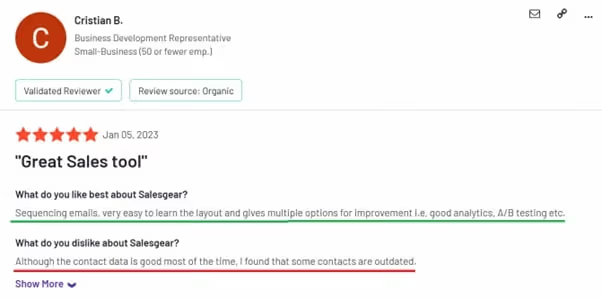
Lisez l’avis complet ici
2. Relances automatisées :
Les clients apprécient la séquence d’emails avec des délais personnalisables.
L’interface est plutôt intuitive et conviviale. Vous disposez également d’analytics détaillées sur votre prospection et de tests A/B.
Lisez l’avis complet ici.
3. Un espace unique pour la communication multicanale :
Rassembler toutes les communications au même endroit est un argument de vente essentiel de Salesgear.
Les utilisateurs peuvent suivre toutes les interactions liées aux ventes, ce qui permet de voir facilement leur progression sur Email, LinkedIn, les appels, et plus encore.
Lisez l’avis complet ici .
4. Facile à utiliser :
Les clients ont exprimé leur satisfaction quant à l’ergonomie de Salesgear.
L’outil offre une gamme de fonctionnalités pour améliorer la productivité commerciale.
Salesgear est simple à configurer et à utiliser, ce qui en fait une excellente option pour l’engagement commercial et la productivité.
Les fonctionnalités ci-dessus sont particulièrement appréciées des utilisateurs. Toutefois, Salesgear propose aussi d’autres fonctionnalités qui méritent d’être mentionnées.
Voyons-les également.
Quelles autres fonctionnalités Salesgear propose-t-il ?
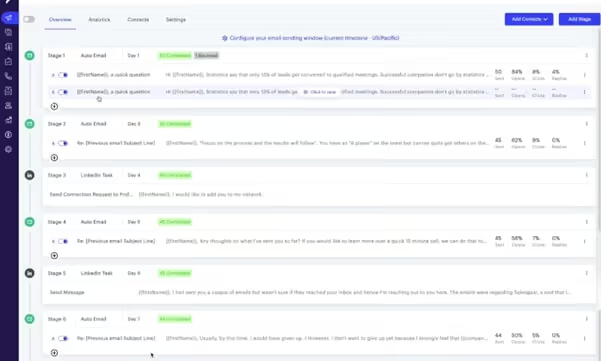
Comme tous les autres outils d’automatisation, Salesgear fonctionne grâce au séquençage et à la mise en place d’un ensemble d’étapes prédéfinies pouvant être appliquées à un large volume de leads et de prospects.
1. Modèles de séquences :
- Vous pouvez utiliser leurs modèles préconçus ou créer les vôtres pour les séquences.
- Salesgear propose également un outil d’écriture par IA pour vos emails, même s’il pourrait être amélioré.
- Vous pouvez aussi créer des tâches LinkedIn pour vous aider à engager votre audience cible.
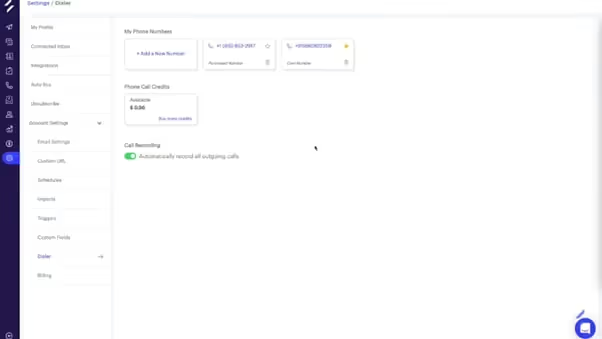
- La fonctionnalité Dialer de Salesgear vous permet de contacter vos prospects plus rapidement.
- Vous pouvez aussi acheter un numéro de téléphone via Salesgear ou l’alimenter.
2. Multiples points de contact pour engager les prospects
- Vous pouvez utiliser une séquence personnalisée pour nourrir tous les leads qui arrivent sur votre plateforme.
- Cela vous aide à automatiser à la fois vos playbooks de leads sortants et entrants.
- Vous pouvez consigner toutes les activités dans HubSpot et ajouter immédiatement un contact à une séquence.
- Utilisez un playbook qui a déjà fonctionné pour automatiser l’engagement avec les prospects grâce à Salesgear.
3. Reporting et gestion des tâches
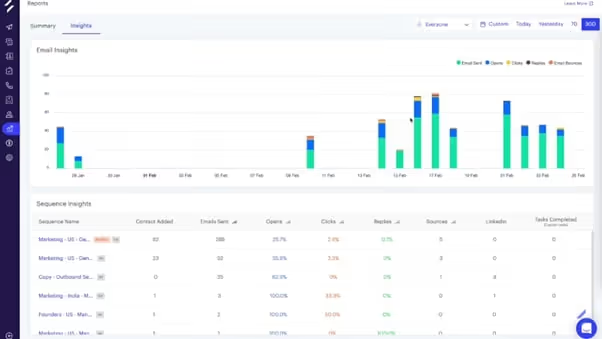
- Le tableau de bord Salesgear fournit des insights et un résumé, ce qui vous permet de comprendre l’avancement d’un seul coup d’œil.
- Les métriques peuvent varier, mais vous avez généralement accès au nombre de tâches programmées pour la journée, aux tâches terminées et aux indicateurs de performance email comme le taux de clics, le taux d’ouverture, etc.
- La fonctionnalité avancée de gestion des tâches permet aux membres de l’équipe de savoir combien d’appels et de connexions LinkedIn ils doivent traiter dans la journée.
- De plus, l’onglet de gestion des tâches facilite l’intégration des nouveaux membres de l’équipe.
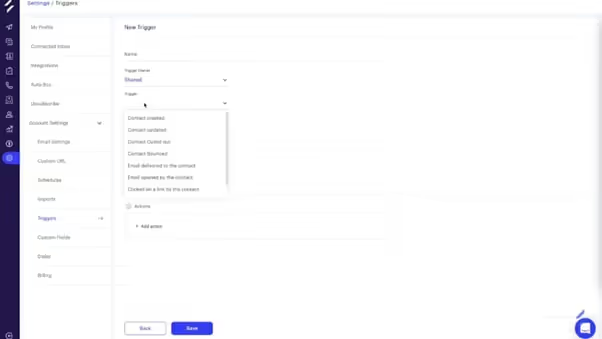
Vous pouvez également définir des déclencheurs pour garder une trace des prospects intéressés. Salesgear vous permet de mettre en place des déclencheurs pour :
✅ Suivre les prospects intéressés
✅ Contact créé / mis à jour / désinscrit / rejeté
✅ Email délivré au contact
✅ Email ouvert par le contact
✅ Lien cliqué par le contact
Mais n’oubliez pas, rien n’est parfait.
Et, pour être honnête, Salesgear présente pas mal de limites qui pourraient vous faire reconsidérer le fait de confier votre prospection à cet outil.
Voyons où Salesgear ne répond pas aux attentes des utilisateurs.
Limites de Salesgear : qu’est-ce que les utilisateurs n’aiment pas chez Salesgear ?
Si vous êtes ici, c’est parce que vous voulez savoir si Salesgear est le bon choix pour vous.
La meilleure façon de le déterminer est de comprendre là où les autres utilisateurs estiment qu’il est insuffisant.
1. Salesgear n’est pas principalement un outil d’automatisation LinkedIn
Vous avez bien lu.
Salesgear est surtout un outil d’automatisation des emails.
Même s’il fonctionne avec LinkedIn, l’automatisation des activités LinkedIn n’a été ajoutée que récemment, et la plateforme reste principalement centrée sur l’email. Cela vous empêche d’exploiter l’immense marché de plus d’un milliard d’utilisateurs sur LinkedIn.
99 % des emails à froid sont souvent ignorés comme du spam.
2. Manque de tutoriels sur le produit
Salesgear manque de bons tutoriels et même de vidéos explicatives essentielles, ce qui rend difficile pour un utilisateur moyen d’apprendre à utiliser le produit.
3. Interruption des emails lors de la déconnexion de la boîte de réception
La campagne email de Salesgear s’arrête sans avertissement lorsque vous déconnectez la boîte de réception.
La campagne email ne reprend qu’au démarrage de l’étape suivante de la séquence.
La dernière chose dont vous avez besoin, c’est que votre argent durement gagné parte en fumée.

Lisez l’avis complet ici .
4. Pas d’intégration avec Jira / autres outils de suivi des tâches
Un utilisateur mentionne que Salesgear est principalement destiné au “pre-sales” et non à la vente, comme il le prétend.
Cela s’explique par le fait qu’il n’existe aucun moyen d’ajouter automatiquement des prospects à un tableau Jira / de suivi des tâches.
Ainsi Salesgear n’est pas une solution de bout en bout, mais simplement un outil de prospection.

Lisez l’avis complet ici .
5. Options de recherche des contacts limitées
Les utilisateurs peuvent uniquement rechercher par adresse email pour trouver un contact dans une séquence particulière sur Salesgear.
Il n’y a pas d’autre option.
Cela doit être assez difficile, surtout si vous ne disposez pas de l’adresse email exacte du prospect.
Prospection limitée = prospection bloquée = pas de revenus 👎
6. Qualité des données de contact limitée
Malgré une base de données de plus de 200 millions d’enregistrements, les utilisateurs ont noté que la base de données de Salesgear contient des contacts obsolètes.
Ainsi, Salesgear a du mal à être fiable et cohérent.

7. Problèmes d’intégration
De nombreux utilisateurs se sont plaints du fait que certaines intégrations cessent parfois de fonctionner avec Salesgear.
Cela peut être particulièrement frustrant lorsque vous passez des heures à perfectionner son automatisation, et que tout est gâché à cause de problèmes d’intégration.
Maintenant que vous savez à quoi Salesgear convient et dans quoi il est mauvais, c’est le bon moment pour regarder les tarifs.
Combien coûte Salesgear ?
Décomposons les tarifs de Salesgear.
-
Forfaits “Data” :
-
Gratuit : 0 $/mois -
✅Recherche d’emails
✅Recherche de numéros de téléphone
✅Recherche approfondie
✅50 crédits
- Basic : 49 $/mois -
✅Tout ce qui est inclus dans le forfait Gratuit
✅1 200 crédits
- Pro : 99 $/mois -
✅Tout ce qui est inclus dans le forfait Basic
✅4 000 crédits
- Pro Plus : 199 $/mois -
✅Tout ce qui est inclus dans le forfait Pro
✅Achat en volume
✅10 000 crédits
Attention :
Salesgear modifie ses tarifs assez souvent. Par exemple, la version Basic coûte 15 $/mois, mais son prix a été augmenté de plus de 300 % pour atteindre 49 $/mois.
- Forfaits “Outreach” :
✅60 minutes d’appel
✅50 actions LinkedIn
✅500 crédits
✅100 minutes d’appel
✅100 actions LinkedIn
- Pro : 99 $/mois -
✅2 000 crédits
✅500 minutes d’appel
✅3 000 actions LinkedIn
- Enterprise :
✅Crédits personnalisés
✅Minutes d’appel personnalisées
✅Actions LinkedIn personnalisées
Si vous êtes déjà une grande entreprise qui a besoin de prospection à froid, Salesgear propose des achats de données en volume et des données illimitées dans son offre Enterprise.
Cependant, son tarif Enterprise n’est pas mentionné sur la page, ce qui est quelque peu gênant.
Et si vous payez à l’année, vous bénéficierez de 20 % de réduction.
Salesgear ne demande pas de carte bancaire pour s’inscrire, mais les tarifs peuvent vite grimper.
Les tarifs ont d’ailleurs posé problème à certains utilisateurs.
Le niveau gratuit permet à tout le monde de tester la solution, mais pour profiter pleinement de cet outil, le minimum requis est leur offre illimitée.
Vous ressentez probablement ce que j’ai ressenti quand j’ai utilisé Salesgear : c’est un très bon outil, mais avec beaucoup de limites, comme :
⚠️ Fonctionnalités limitées d’automatisation LinkedIn.
❌ Manque de tutoriels
❌ Déconnexions email
❌ Options de recherche limitées
❌ Qualité médiocre des données de contact
❌ Problèmes d’intégration
Mais ne vous inquiétez pas. Je ne vais pas vous laisser sans vous dire où chercher une alternative.
(Spoiler : c’est Outly 😎)
Outly : la meilleure alternative à Salesgear pour les équipes commerciales centrées sur LinkedIn
Outly est bien plus qu’un simple outil d’automatisation commerciale.
Il vous permet d’automatiser le travail répétitif de la prospection à froid parce que nous savons que cela peut devenir agaçant, fatigant et répétitif.
Cela vous permet de ne pas passer à côté des avantages de l’immense base d’utilisateurs de LinkedIn.
Quelque chose que vous ne pouvez pas exploiter avec Salesgear 😉.
Pourquoi devrais-je choisir Outly plutôt que Salesgear ?
Voyons pourquoi Outly a l’avantage sur Salesgear.
👉🏼 Outly est un outil LinkedIn qui est aussi performant pour l’automatisation des emails. Son positionnement centré sur LinkedIn vous garantit de ne manquer aucune nouvelle opportunité sur ce canal.
👉🏼 Notre équipe de support client dédiée est toujours là pour vous aider à résoudre les problèmes que vous pourriez rencontrer.

👉🏼 Outly propose de meilleures intégrations avec les CRM populaires via Zapier, ce qui vous évite de perdre du temps à déboguer des problèmes d’intégration.
👉🏼 L’intégration complète avec les CRM populaires garantit qu’il s’agit d’une véritable solution commerciale de bout en bout et non d’un simple outil de prospection.
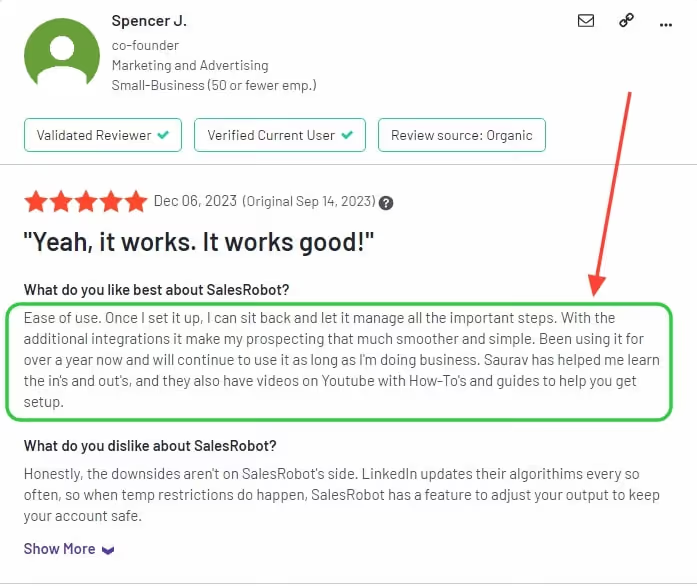
👉🏼 Outly a fait ses preuves en maintenant les campagnes en fonctionnement avec un temps d’arrêt minimal, voire nul, afin que vous obteniez ce pour quoi vous payez.
Aucune excuse.
👉🏼 Outly vous offre des options de recherche directes au sein de la séquence pour vous simplifier la vie.
Vous pouvez rechercher par nom, email, poste — comme vous voulez.
👉🏼 LinkedIn est connu pour signaler les comptes qu’il considère comme du spam.
Avec Outly, vous n’avez pas à vous soucier de tout cela puisque notre configuration intelligente sécurise votre compte.

Avec la prospection multicanale, votre processus de prospection à froid aura un aspect naturel et non robotique, malgré le nom Outly. 😁
👉🏼 Aimer et commenter des publications sur LinkedIn, féliciter des étapes clés et envoyer automatiquement des InMails LinkedIn font partie des actions qu’Outly peut effectuer à votre place.
👉🏼 Outly peut aussi vous aider à automatiser vos commentaires sur les publications de vos prospects grâce à ses fonctionnalités propulsées par l’IA.
👉🏼 Tout comme les variables IA, configurez votre prompt IA personnalisé et vous pouvez ajouter votre commentaire sur des publications dans le cadre de votre séquence de messages !
👉🏼 Outly est très performant pour les images/GIFs hyper-personnalisés et les messages soigneusement rédigés qui sonnent humain, et non robotique.
Outly vous aide aussi à rédiger des messages soigneusement construits qui sonnent humains, pas robotiques.
La fonctionnalité AI Variables vous donne accès à une personnalisation propulsée par l’IA basée sur le profil LinkedIn de votre prospect.
Vous pouvez utiliser les AI Variables publiques (ou en créer une personnalisée pour votre cas d’usage).
Ajoutez simplement votre prompt IA à votre séquence de messages, et Outly complétera les champs avec les informations du prospect récupérées depuis ses profils LinkedIn.
👉🏼 Toutes les communications via Outly peuvent être gérées depuis une seule boîte de réception fiable.

La fonctionnalité AI Appointment Setter d’Outly engage vos prospects en pilote automatique, ce qui réduit le risque de perdre des leads dans votre pipeline commercial.
Notre agent IA maintiendra l’engagement du prospect dès le premier message, jusqu’au moment où il réserve un rendez-vous avec vous.
De plus, les capacités IA d’Outly vont au-delà de l’automatisation de base. La plateforme utilise l’IA pour détecter le sentiment et l’urgence dans les réponses des prospects, ce qui vous aide à prioriser les leads les plus prometteurs et à répondre de manière appropriée. Elle dispose même d’une fonctionnalité de prise en compte du temps qui planifie une réponse en fonction de la manière dont votre prospect répond.
👉🏼 Outly vous permet aussi d’automatiser bien plus que de simples DM LinkedIn classiques.
Vous pouvez automatiser des messages vidéo personnalisés et des notes vocales dans vos séquences de messages.
Et pour vous aider à faire passer votre personnalisation à l’échelle, la fonctionnalité AI Voice Clone d’Outly vous permet d’automatiser vos notes vocales et vidéo pour chaque prospect de votre liste.
Enregistrez un échantillon de dix secondes, ajoutez la note vocale que vous souhaitez envoyer dans votre séquence de messages, et Outly enverra une note vocale qui vous ressemble exactement !
Il y a tellement de fonctionnalités ! Je suis à bout de souffle.
Mais attendez !
Vous devez vous demander combien coûtent toutes ces fonctionnalités, n’est-ce pas ? Voyons cela.
Quels sont les tarifs d’Outly ?
Les tarifs d’Outly reposent sur des forfaits fixes. La facturation annuelle inclut 2 mois offerts.
Professional : $197/mois ($164.17/mois en facturation annuelle) 3 000 analyses de profils IA par mois, messages hyper-personnalisés, workflows personnalisés avec embranchements, LinkedIn et email dans une même séquence, notes vocales et vidéo, un accompagnement à la prise en main et un support prioritaire.
Elite : $347/mois ($289.17/mois en facturation annuelle) Tout ce qui est inclus dans Professional, plus des prospects IA illimités, les réponses autonomes aux campagnes IA, les imports de contacts autonomes et les étapes vocales et vidéo illimitées.
Enterprise : tarifs personnalisés Limites, workflows et intégrations sur mesure, avec un onboarding premium mené par un CSM pour les grandes organisations.
Chaque offre inclut un essai gratuit de 14 jours. Consultez la page tarifs pour les détails à jour.
Conclusion : qu’avons-nous appris dans cet avis sur Salesgear ?
Malgré le fait que Salesgear soit l’un des meilleurs outils d’automatisation du marché, comme vous pouvez le constater dans cet avis, il présente pas mal de limites.
Avec son séquençage d’emails et son composeur rapide, Salesgear promet de vous simplifier la vie. Le processus de prospection devient plus accessible.
Mais avant de vous emballer, gardez à l’esprit que les emails à froid appartiennent en grande partie au passé, et que Salesgear convient à la prospection à froid via l’Email, et non LinkedIn.
Au cours des 12 à 18 derniers mois, les taux de réponse aux emails à froid sont en baisse, avec une moyenne sectorielle de 1 %.
À l’inverse, LinkedIn affiche un taux de réponse moyen de 14 %.
Soit 14 fois plus.
14 fois plus de réponses pour votre entreprise signifie que vous ne serez pas ce jeune homme en attente d’une réponse.
La raison du succès de LinkedIn par rapport à l’Email est simple.
Sur LinkedIn, les gens peuvent voir votre travail, votre réseau, votre expérience et votre identité.
En revanche, si, par chance, votre email n’atterrit pas dans les spams et que l’utilisateur l’ouvre, ce n’est qu’un autre… eh bien, email dans sa boîte de réception.
Pas très séduisant.
La plupart des utilisateurs passent de Salesgear à Outly principalement à cause du canal de prospection.
De plus, la personnalisation propulsée par l’IA d’Outly aide à créer des messages plus engageants et plus pertinents pour les prospects. L’IA analyse les données du prospect afin d’optimiser le timing et le contenu du message pour de meilleurs taux de réponse.
Par ailleurs, Outly s’impose comme l’alternative n°1 à Salesgear grâce à ses workflows de prospection multicanale, ses options de personnalisation propulsées par l’IA, son support complet des intégrations et ses fonctionnalités de sécurité de compte pour la prospection sur LinkedIn et par email.
Si vous hésitez encore à propos d’Outly, faites le saut et optez pour l’essai gratuit de 14 jours.
À la prochaine, salut.
Avertissement : le contenu de cet article reflète nos propres opinions et jugements fondés sur nos recherches et notre expérience à la date de publication. Les comparaisons effectuées avec d’autres logiciels ou outils sont fournies à titre informatif uniquement et reposent sur des informations publiques ainsi que sur notre propre analyse. Nous ne prétendons pas à une exactitude absolue et encourageons les lecteurs à effectuer leurs propres recherches afin de se forger leur propre opinion. Même si nous pouvons évoquer les offres concurrentes, notre priorité reste de mettre en avant les fonctionnalités et les avantages d’Outly. Outly n’est affilié à aucun autre logiciel ou outil mentionné dans cet article.
Émerveillez vos leads en vous clonant et en envoyant des vidéos et notes vocales personnalisées à chaque lead sur LinkedIn.
Si vous ne répondez pas aux leads dans les 5 minutes, vos chances de les convertir chutent de 50 %. Notre IA répond instantanément à votre place ! (et oui, vous pouvez l’entraîner)
Ne tirez pas à l’aveugle. Obtenez des analytics détaillées sur ce qui fonctionne
Outly vous permet d’inviter d’autres membres de l’équipe, afin qu’ils puissent ajouter leur compte LinkedIn, lancer des campagnes de prospection et obtenir d’excellents résultats comme vous.